Participating Frequently
August 17, 2022
Answered

Hints do not appear when using Drag n Drop feature

  • August 17, 2022
  • 2 replies
  • 430 views

I am using Captivate 2019 release version 11.5.5.553.

When I use the drag n drop feature, I like to use a hint.

However, the hint will not appear if I bring it in during the slide.

It will only appear if I bring it in at the very beginning of the slide.

If I have a 10 second slide and I set it to appear for 3 seconds, it will stay for the entire slide and will not disappear after the 3 second timeout.

Can anyone assist me with this issue?

Thank you,

Dirk

This topic has been closed for replies.
Correct answer RodWard

I think your "issue" is probably just due to not understanding how Drag and Drop slides work.


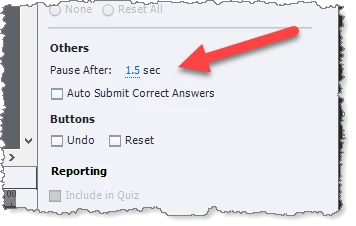
By default, a Drag and Drop interaction has a preset pause point at 1.5 seconds from the beginning of the slide.  If you have added another text object (i.e. the Hint) from the start of the slide, then it will remain visible because the slide is paused 1.5 seconds BEFORE it was due to disappear.


I suggest you will need to extend the duration of the drag and drop slide to something around five seconds or longer and then adjust the Actions > Pause After timing of the slide to be greater than 3 seconds if you want your Hint to disappear after three seconds.

2 replies

Lilybiri
Legend
August 18, 2022

When do you want to have the hint appearing?  Hints are not available for normal quiz slides neither, only for interactive objects. If you are OK with having a 'hint' appearing when the Submit button is clicked and results in a wrong answer, you may have a look at this blog post:

http://blog.lilybiri.com/d-and-d-feedback-messages


Dirk664Author
Participating Frequently
August 31, 2022

I have the settings set to move to next slide upon success. When a user moves the source and drops somewhere other than the target, I wanted a hint to appear. Can that be done?

Lilybiri
Legend
August 31, 2022

You could use the Object Actions. But you have marked an answer as being correct, is this a new question?

Have a look at:

http://blog.lilybiri.com/d-and-d-feedback-messages

http://blog.lilybiri.com/drag-and-drop-actions


RodWard
Community Expert
RodWardCommunity ExpertCorrect answer
Community Expert
August 18, 2022

I think your "issue" is probably just due to not understanding how Drag and Drop slides work.


By default, a Drag and Drop interaction has a preset pause point at 1.5 seconds from the beginning of the slide.  If you have added another text object (i.e. the Hint) from the start of the slide, then it will remain visible because the slide is paused 1.5 seconds BEFORE it was due to disappear.


I suggest you will need to extend the duration of the drag and drop slide to something around five seconds or longer and then adjust the Actions > Pause After timing of the slide to be greater than 3 seconds if you want your Hint to disappear after three seconds.

Dirk664Author
Participating Frequently
August 18, 2022

Thank you. I was not aware of how the "Pause After" worked. That was the fix.

Lilybiri
Legend
August 18, 2022

Understanding how the timeline can be paused is very important indeed. One of my most visited blogs:

http://blog.lilybiri.com/pausing-captivates-timeline