


Participant
January 21, 2022
Question

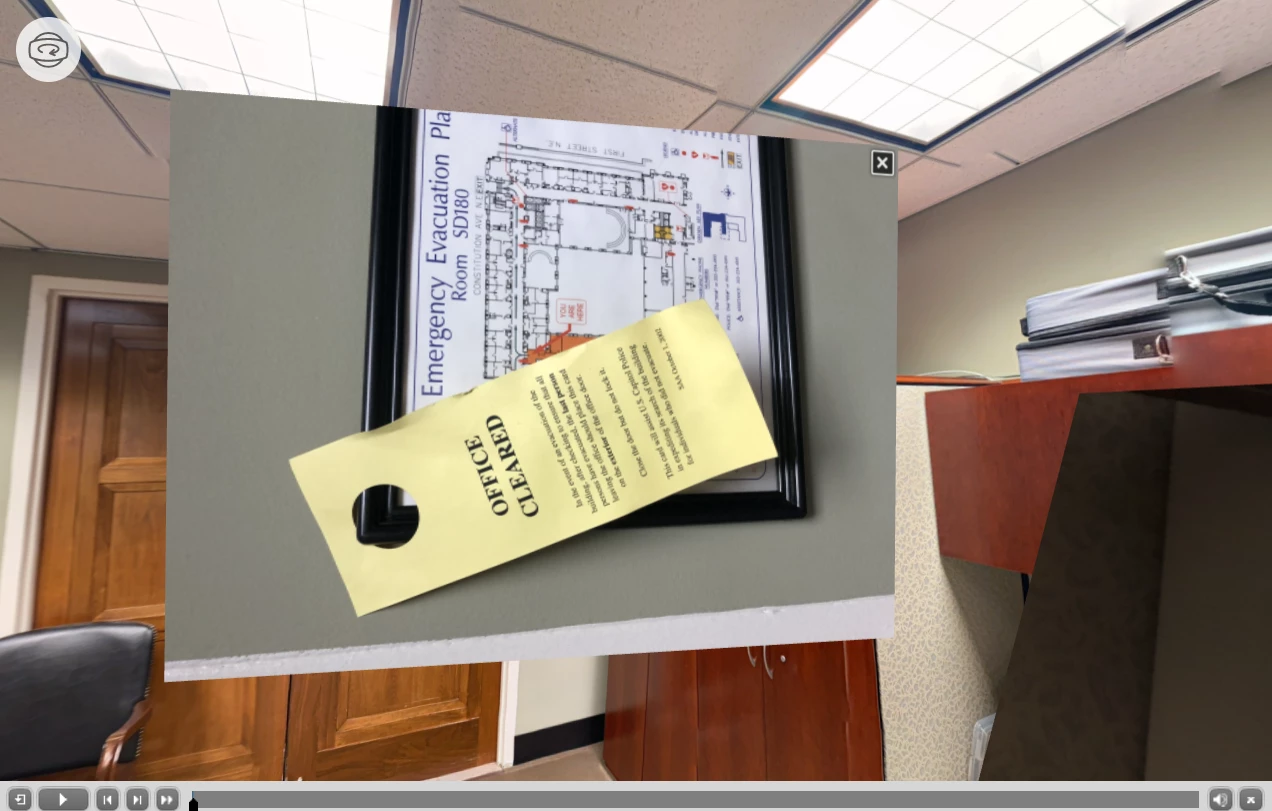
Hotspot Button image displays sideways

  • January 21, 2022
  • 1 reply
  • 324 views

Hello,  on my 360 slide, I added hotspots that display an image when clicked. But all the images display sideways. I have checked that the images were uploaded in the upright position. I have even rotated the image on my computer, then reuploaded it thinking I'd match Captivate's logic. No luck. And there isn't an option to rotate the image from within the Captivate 360 slide. Any advice? 
    This topic has been closed for replies.

    1 reply

    Lilybiri
    Legend
    January 22, 2022

    This is a custom image hotspot? Which type of image did you use?

    Participant
    January 31, 2022

    This is not a custom hotspot. I used a normal hotspot (the exclaimation mark one to be exact) and make it display an image on click. This is the image that displays on click. It's a JPEG image. No matter how I reduce the size or rotate the image on my computer, it displays sideways as show. A few others do too. 

    Participant
    January 31, 2022

    Sorry image is a JPG