
How can I change the function of a flash button?
Hello,
Not sure if this should go in the Flash forum or Captivate forum, but does anyone know how where to find ActionScript 3 commands for Captivate?
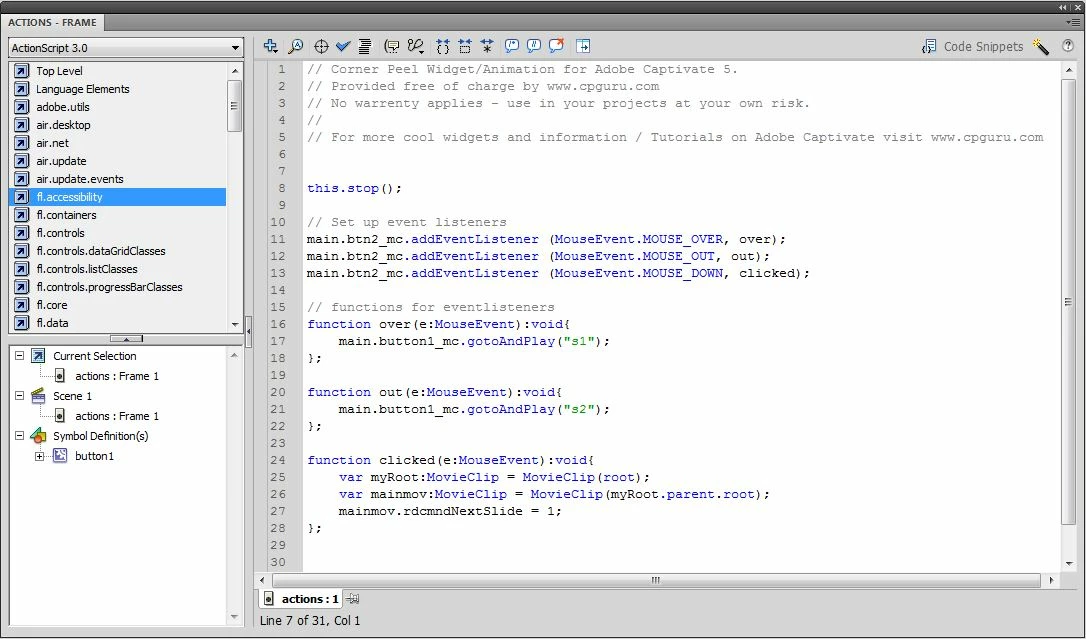
I downloaded a pre-made Flash button (source file) for Adobe Captivate that was originally made to make a video go to the next slide, when pressed. It does that fine, but I wanted to know how to use the ActionScript code in Flash Professional CS5 to have the button JUMP to a specific slide in Captivate, instead of just go to the NEXT slide. I know generally how code works, but have never really used it, and don’t know the specific command to make that happen. Currently the relevant part of the code in the Flash button reads:
function clicked(e:MouseEvent):void{
var myRoot:MovieClip = MovieClip(root);
var mainmov:MovieClip = MovieClip(myRoot.parent.root);
mainmov.rdcmndNextSlide = 1;
I suspect that I just have to change the last line to something else and it should work, but I would need the command. Can anyone tell me what needs to be changed in the above code to make that happen?
The full code is below. Thanks.
 AdChoices