
Participant
February 16, 2013
Question

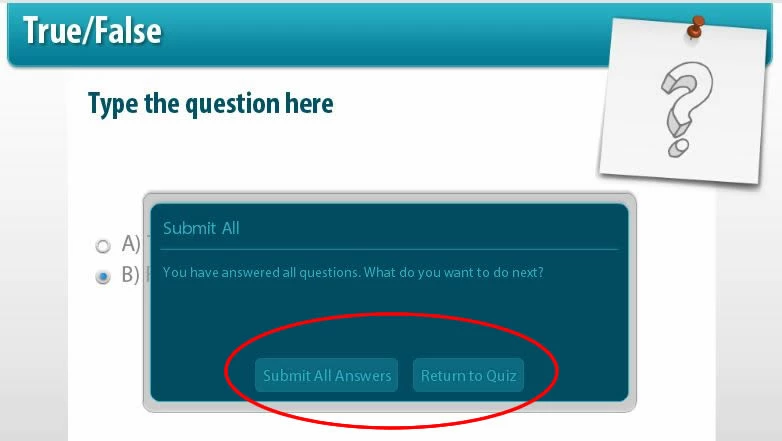
How can I edit the "Submit All Answers" and "Return to Quiz" button text?

  • February 16, 2013
  • 2 replies
  • 1864 views

With the new Captivate 6 "Submit All" feature enabled, I am trying to edit the prompt message text but I cant seem to find a way to do this. Does anyone know how can I edit the text on the "Submit All Answers" and "Return to Quiz" buttons?
Thanks so much!

This topic has been closed for replies.

2 replies

Participant
March 9, 2013

Yes a need solve this problem with editiing submiting all window, because we develop projekct with another language an no possibility change!!!

Lilybiri
Legend
March 9, 2013

Is this a double posting? And did you read my answer?

Participant
March 9, 2013

Thank you for email

i found this problem at this two postings, and i´m starter member and elernibg 2.5 subscriptions payer,

i´m waiting for this solving 2 months at this phorum and i replay question twice...

i don´t member if this solved if this message, which is not on preferences can setup Runtime Dialog translate (only colors on Object style manager)

i really need posibility translate at runtime dialog translate “Submit All”, after answered for al questions slide button “Submit All Answers, and “Return to Quiz” ????

Thank very much for solving for this red problem

Mgr. Milos Niederhafner

Director Profisystem Group LTD company

Lilybiri
Legend
February 16, 2013

I posted an answer to a similar question this morning:

http://forums.adobe.com/message/5077752#5077752

But the Label for 'Submit All' is available for editing in Preferences,  Quiz, Default Labels.

Lilybiri

Participant
February 16, 2013

Hi, Thank you for the response.