Inspiring
July 18, 2019
Answered

How can I get the result of this function to display on my slide?

  • July 18, 2019
  • 2 replies
  • 486 views

Hello everybody,

I'm struggling with a task I have to complete, any help is very much welcome at this point.

Context: at the end of the elearning I'm developing, I need to include a slide (that will be printed for archives and payment and stuff ) with the duration the trainee took. Each trainee is going to have a different time due to questions, quiz etc. I also like to say that I'm more a specialist in the stuff I teach then in javascript or advanced actions.

What I did: on the page where I want to display the time, I trigger an advanced action.

In it, I assign the variable FinalTime with cpInfoElapsedTimeMS (it would be so nice if it had immediate formatting options as for the current date ).Now, I need this ElapsedTime to look readable, not just in seconds but as a human timing as for a video.

So then in the advanced action I try to execute a Javascript which is:

var millisec = window.cpAPIInterface.getVariableValue("FinalTime");

function getMyTime(millisec) {

        var seconds = (millisec / 1000).toFixed(0);

        var minutes = Math.floor(seconds / 60);

        var hours = "";

        if (minutes > 59) {

            hours = Math.floor(minutes / 60);

            hours = (hours >= 10) ? hours : "0" + hours;

            minutes = minutes - (hours * 60);

            minutes = (minutes >= 10) ? minutes : "0" + minutes;

        }

        seconds = Math.floor(seconds % 60);

        seconds = (seconds >= 10) ? seconds : "0" + seconds;

        if (hours != "") {

            return hours + ":" + minutes + ":" + seconds;

        }

        return minutes + ":" + seconds;

    }

window.cpAPIInterface.setVariableValue("Duration",getMyTime);

Well, let's add that I declared all my variables in CP and that on my slide I inserted $$Duration$$

The answer I receive is 0 when running everything. So can anybody tell me what I did wrong, and ideally tell me how to do it right?

Thanks so much for reading.

This topic has been closed for replies.
Correct answer JohanBANELLA

So, I finally found a way to do what I wanted, I share it here in case someone else would be interested.

On the one slide where I want to see the timing, on slide enter I run an advanced action. During my experimentation, I found out that I wanted to do as little as possible with javascript, being a complete newbee.

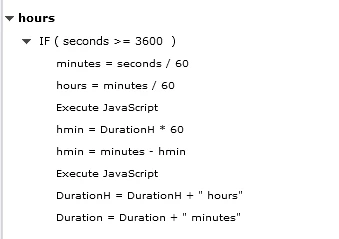
So my conditional action finally look like this:

The code executes JS for which the code is every time pretty much the same this is the first one:

var rounding = window.cpAPIInterface.getVariableValue("seconds");

var rounding = Math.floor(rounding);

window.cpAPIInterface.setVariableValue("Duration", rounding);

For the next JS the codes are almost the same, what changes is the name of  the input and output variables.

And finally the MOST IMPORTANT thing, the one it took me so much time and frustration to find out: to test all of this, a preview of the project is not enough! The project must be published and active X activated in the browser. Seems simple and stupid but I had to discover this bit of info the hard way.

2 replies

JohanBANELLAAuthorCorrect answer
Inspiring
July 20, 2019

So, I finally found a way to do what I wanted, I share it here in case someone else would be interested.

On the one slide where I want to see the timing, on slide enter I run an advanced action. During my experimentation, I found out that I wanted to do as little as possible with javascript, being a complete newbee.

So my conditional action finally look like this:

The code executes JS for which the code is every time pretty much the same this is the first one:

var rounding = window.cpAPIInterface.getVariableValue("seconds");

var rounding = Math.floor(rounding);

window.cpAPIInterface.setVariableValue("Duration", rounding);

For the next JS the codes are almost the same, what changes is the name of  the input and output variables.

And finally the MOST IMPORTANT thing, the one it took me so much time and frustration to find out: to test all of this, a preview of the project is not enough! The project must be published and active X activated in the browser. Seems simple and stupid but I had to discover this bit of info the hard way.

Lilybiri
Legend
July 18, 2019

Did you define the user variable  in Captivate?  Hope you inserted it with the X button from the Properties to make sure the exact name of the variable is inserted. I have created similar calculations in Captivate, too lazy to go testing scripts. I hope one of the JS experts chimes in.

Inspiring
July 18, 2019

Hi, thanks for replying, Yes to the user variables, and yes to inserting with the X button in the Properties.

I don't seem to see your last sentence completely,  but searching the web I haven't managed to find an entire code snippet doing just what I want.

Unfortunately, I'm still stuck.

Lilybiri
Legend
July 18, 2019

Have a lot on my plate today, should screen that JS...

Which event is used to fire the action? Captivate's actions are event driven. Attach that action to a button on the slide, is it giving a correct result when the button is clicked?

Did you see my blog post:

Display Time (CP2019) - Captivate blog