
ruthg84
Known Participant
November 17, 2016
Question

How can I make a slide progress after certain buttons are clicked?

  • November 17, 2016
  • 3 replies
  • 430 views

Hi,

I have a game that I am trying to make. It consists of several smart shapes which I am using as clickable buttons. When users have selected all correct answers, I'd like the slide to progress rather than to continue until time out. I already have an advanced action on the slide. Is is possible to add another? And if I do, what should I make it say?

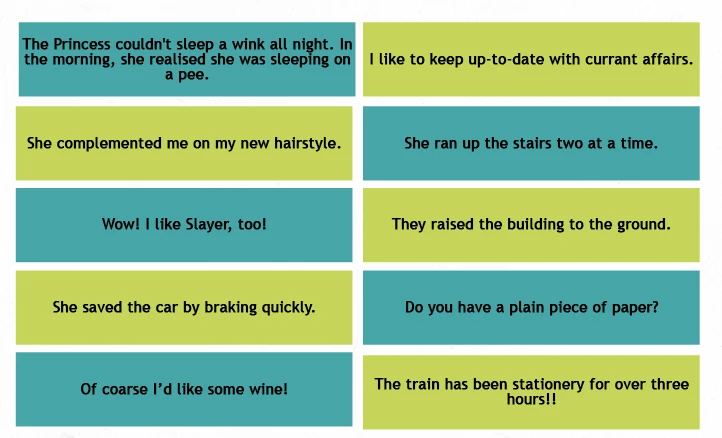
Here is the slide. The point is to spot the incorrectly used homophones:
    This topic has been closed for replies.

    3 replies

    ruthg84
    ruthg84Author
    Known Participant
    November 19, 2016

    Thanks Rod, I'm doing quite well with the slide now. I added user variables and had them make the slide progress once all the correct buttons are clicked. However, I am stuck on one thing: when the user has not yet selected all the correct buttons and clicks 'check answer', I would like a text box to pop up saying 'Keep going! You missed some!'. I can make the text box pop up, and have applied an effect to it (using the 'else' part of the conditional action) to make it disappear. However, it only works once. I have added a line in the action to say that the 'check answers' box should be enabled, thinking this would allow the user to click the box again (and have the text box pop up again if they still don't have all the correct answers). But this doesn't seem to be working. Can you help?

    Here is the 'else' part of the action:

    Thanks!

    Ruth

    RodWard
    Community Expert
    Community Expert
    November 19, 2016

    When does your conditional action get executed?  What event/s are you using to execute it?

    ruthg84
    ruthg84Author
    Known Participant
    November 19, 2016

    It gets executed when the 'check answers' button is clicked.

    ruthg84
    ruthg84Author
    Known Participant
    November 18, 2016

    Thanks Rod, this is a good overview. I have already used conditional actions before, when I have specific instructions on what to put in each box, but I am still lost as to how to do the following things in a single conditional action:

    1) When slide is entered, all buttons are enabled

    2) When certain buttons have been clicked, the slide progresses.

    I just don't know what to put in the literal/variable box to make these two actions happen...

    RodWard
    Community Expert
    Community Expert
    November 18, 2016

    Go back and look at the videos.  It explains there that if you want certain actions to ALWAYS be performed then you can use a Dummy condition such as IF 1 is equal to 1 (which it always would be).  Then the actions for that decision block will always be executed.  In your case the actions would be to enable all the buttons you want enabled.

    The followup Decision Blocks would execute any other actions you wanted done based on whether or not certain variables were set to the required values.  You need to have separate User Variables set up to be Assigned a value of 1 when each buttons is clicked (in addition to whatever other action those buttons perform, which means those buttons will also be executing Advanced Actions that allow multiple actions not just single ones).  Your Conditional Action can then have one Decision Block that checks to see if all of the tracking variables have been set to 1 and if so then execute the action to progress the slide.

    RodWard
    Community Expert
    Community Expert
    November 17, 2016

    Sounds like you need to learn how to use Conditional Actions and User Variables.

    Using Conditional Actions in Adobe Captivate | Infosemantics Pty Ltd

    Here's a tutorial that explains how to create a dynamic menu page using Conditional Actions:

    Create a Dynamic Menu Slide in Adobe Captivate | Infosemantics Pty Ltd