Based off how I need my page to work I was able to find information from great experts like Lilybiri and others. I have used their suggestions to allow me to get to this point. The Advanced Actions above allows me to do what I need to a certain point. Feel free to recreate what I have done using the same Advanced Actions and replacing the cpCmndGoToFrameandResume with cpCmndGoToFrame and you will see that when my icon is pressed it will stop the audio because the assignment does not let you the continue of the an audio file without have the cpCmndGoToFrameandResume in place. Anyway I appreciate you asking because we are all trying to learn so let's wait and see what Lilybiri recommends with regards to my Advanced Actions.
I created quickly an example file, just having a slide with three shape buttons that act as toggles, and a next button. The first three buttons pause at exactly the same time, and the Next button later.
Since it is slide audio, clicking the buttons will not pause the audio at all (common misunderstanding). I created a shared action, with the object to be shown and the variable (mine are labeled v_one instead of v_visib) as parameters:
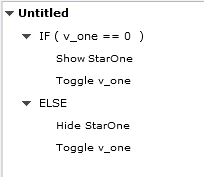
StarOne is what you want to show/hide. You can click infinite times on each button to show/hide that item. It will not bother the audio, once it started playing it will continue. When audio is over, you can still continue to click. Only a click on the Next button will advance to the next slide. This is my Timeline
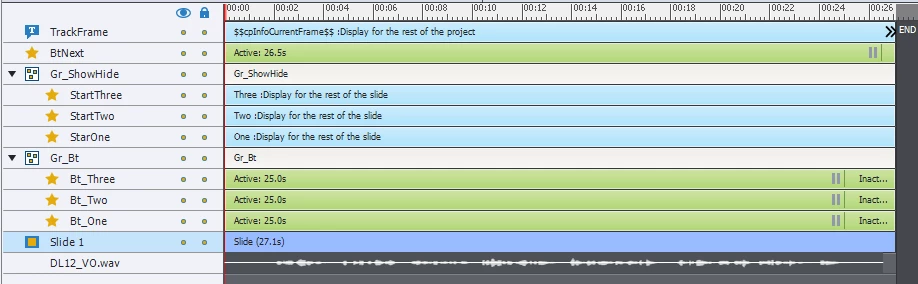
No need to rewind the playhead in this case at all.

 AdChoices