
Participant
May 24, 2018
Question
How can I show a sub menu when I rollover a button?
- 1 reply
- 157 views
- Translate
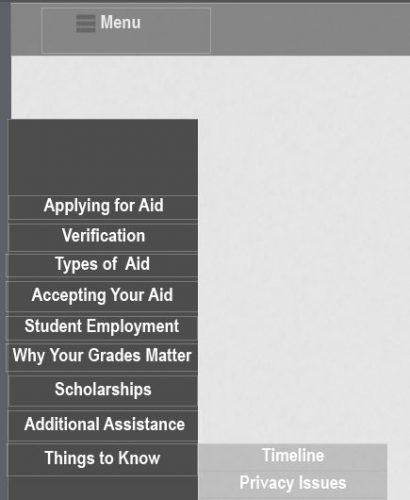
If a user rollovers Things to Know, then I would like for the submenu containing Timeline and Privacy issues to show (look below). The user would then be able to click on a link in the submenu (such as Timeline) which would then redirect him/her to the appropriate slide.
I am able to show the sub menu when the user clicks on the Things to Know using advanced actions, but I do not want the user to have to do an extra click. Is there a way to achieve this in the rollover state? Or, does it have to be an Advanced Action? I am open to suggestions and/or alternatives. I do not want to use the built in TOC.


 AdChoices