
Participating Frequently
June 2, 2015
Question

How do I change the folder structure of a published Captivate 8 project?

  • June 2, 2015
  • 2 replies
  • 215 views

Hi!

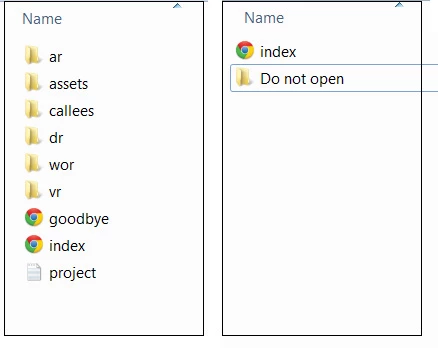
I need to publish my Captivate 8 project as a stand-alone version. I have understood that this is not available in Captivate 8. Therefore, I would like to place the translations, ar, assets, etc. folders in a folder within the published Captivate folder.  By doing this I hope that the users will easier find the Index file.
This topic has been closed for replies.

2 replies

TLCMediaDesign
Inspiring
June 2, 2015

Lieve's option would be the best.

If you wanted to do what you are illustrating you would need to create a dummy index.htm that would immediately redirect to the real index.html. You would put all of the published files inside of the Do Not Open folder.

You would need to do major editing if you move the location of the index, paths would not be the same to supporting files.

Lilybiri
Legend
June 2, 2015

You can publish to exe again, if you upgraded to 8.0.1.242.