
Participant
January 14, 2020
Answered

How do I create a captivate responsive video that doesn't use SWF

  • January 14, 2020
  • 2 replies
  • 647 views

I have just started using Captivate. I was able to create my project without any problems. It has a "click here" option on each slide that advances to the next slide. Can someone tell me if it is possible or if it is possible how to publish the project so that is stays interactive but doesn't need Flash?


[Moving from generic Start/Help forum to the specific Program forum... Mod]
[To find a forum for your program please start at https://community.adobe.com/]
This topic has been closed for replies.
Correct answer Lilybiri

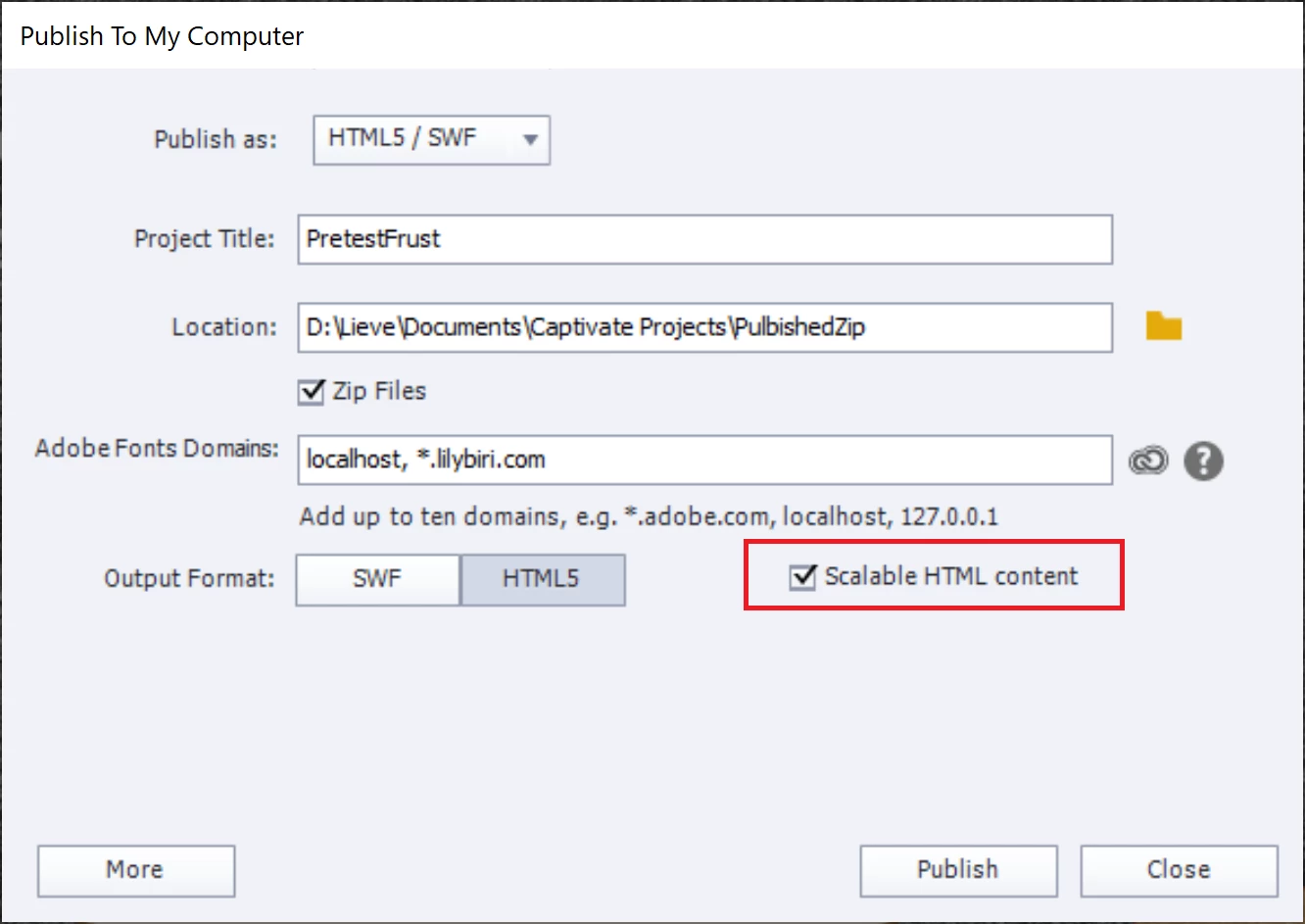
Non-responsive project? I suspect that is the case. Check the HTML Tracker under the Project menu for possible issues when publishing to HTML5. Then set up the Publishing dialog box like this:

I used this screenshot for another user to indicate the Scalable HTML option. If you check it, the published and to a webserver uploaded output will adapt to the size of the browser.

I checked the option 'Zip files', but that is not necessary. Depends where and how you will upload the published file. For the eLearning portal it is necessary to zip the folder (they upload to an amazon service). To upload to my domain I have to take that option away.

2 replies

Participant
January 17, 2020

I found what the problem was, I had switched from SWF by clicking on the HTML5 button and I thought the  HTML5 output was selected and it wasn't. I had to click on the HTML5 button again to get the swf attributes to clear. Screen shot 2 displays what it should look like. Then my output generated fine without creating a SWF file.


Lilybiri
Legend
January 17, 2020

That was the reason I showed a screenshot of how the publishing dialog box should look. Did you not see that screenshot?

Participant
January 31, 2020

Sorry but, I did see the screen shot but when I clicked on HTML5 it didn't change/clear the information to look like your screen shot.  I had to click back and forth to get it to clear. It happens the same way every time and all of the projects I'm converting.

Lilybiri
Legend
January 14, 2020

Not sure what you mean by 'responsive video'? If this is a responsive project you can publish only to HTML5. It is a non-responsive project, you have to publish only to HTML5.

Participant
January 14, 2020

Maybe "responsive" is not the correct term, maybe "interactive" is better. Per my description the use has to click on a menu option to advance to the next screen. 

Lilybiri
LilybiriCorrect answer
Legend
January 14, 2020

Non-responsive project? I suspect that is the case. Check the HTML Tracker under the Project menu for possible issues when publishing to HTML5. Then set up the Publishing dialog box like this:

I used this screenshot for another user to indicate the Scalable HTML option. If you check it, the published and to a webserver uploaded output will adapt to the size of the browser.

I checked the option 'Zip files', but that is not necessary. Depends where and how you will upload the published file. For the eLearning portal it is necessary to zip the folder (they upload to an amazon service). To upload to my domain I have to take that option away.