
Inspiring
February 4, 2020
Answered

How do I create HTML5 slidelets?

  • February 4, 2020
  • 11 replies
  • 919 views

I'm trying to convert SWF features to HTML5. I have a number of slidelets.

In the community, I was able to find this post that talks about slidelets:

https://helpx.adobe.com/captivate/how-to/apply-effects.html

However, this contains the following note:

"The HTML5 output for the procedure described in this section, is available here [INTERNAL NOTEPending hosting]. You can use it as reference as you go through the steps in the following procedure:"

Wondering now if HTML5 slidelets are not yet supported. If that's true, can someone suggest a different alternative to produce an effect where you point at text to pop up a window that contains other objects such as images?
 

This topic has been closed for replies.
Correct answer Lilybiri

OOOOHHH! I did read -- just not far enough. Patience not one of my strongsuits! I'm such an idiot! 

Thanks for sticking with me, and I most definitely earned your question! 

THANK YOU THANK YOU THANK YOU! I bow at your feet!


I am also persuaded that using multistate objects instead of hide/show would save you lot of time as well. But you don't want to read... have compared both workflows extensively. Problem with Hide/show is that you need to reset the situation with an action On Enter for the slide, whereas that is not necessary if you use a multistate object with the normal state being 'invisible' and the image in a custom state. Extra bonus: click boxes are not supported in a responsive project created with Fluid Boxes (which you seem to confuse with multistate objects). You would need to use another workflow.


Instead of a click box over a text, you can use a Hyperlink (from the text) which can also trigger several actions.


All Click/Reveal examples in this presentation which I just published, are created with multistate objects:

Interactivity in Captivate


You are not unique, beware, lot believe to save time by skipping tutorials partially but end up with losing lot of time.

11 replies

Lilybiri
Legend
February 4, 2020

Rollovers are not supported anymore, because no mobile device can show them. Although Rollover Captions and Images still will be functional on laptop/desktop that is not the case for Rollover slidelets.

If you want to use Rollovers even in these limitations, lot can be done with the Rollover state of an interactive object, or by using multistate objects in combination with clicks. 

Inspiring
February 4, 2020

OK, good to know. These courses will only be available on PCs; no mobile devices. But I'm not following.

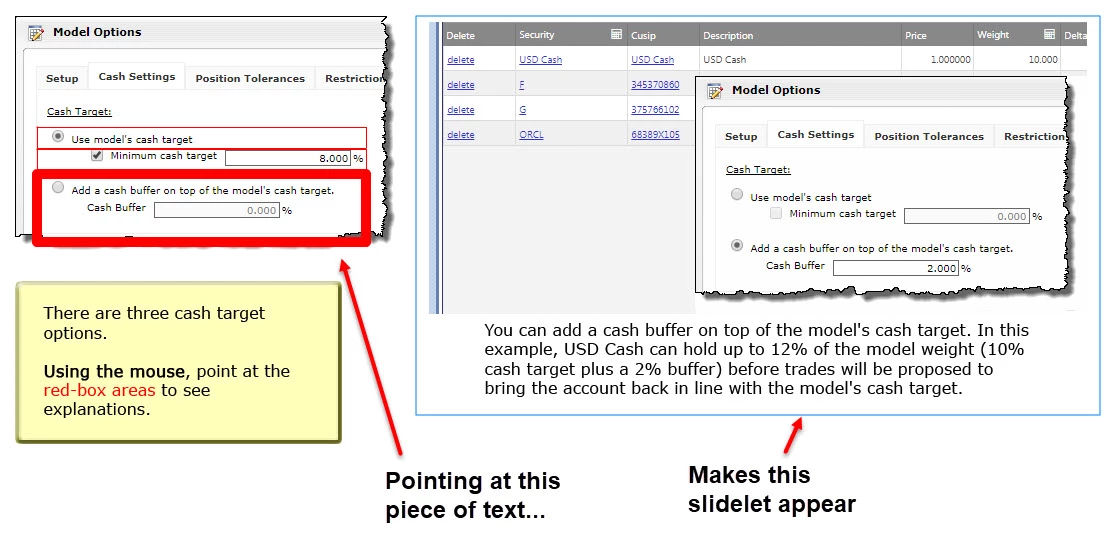
What interaction would you use so that pointing at (or clicking) the text in the picture above makes an image appear on the same slide?

RodWard
Community Expert
Community Expert
February 4, 2020

Captivate lacks default events for mouseover/mouseout/mousedown that could be used to trigger advanced actions.  It is possible to set those events up using JavaScript but that sounds beyond your capabilities at the moment.


My suggestion would be to just use click events to drive the interaction.


You just need to make the object that gets shown initially Not Visible in Output, then use either a Smart Shape or Click Box over the top of the text on the left of your screenshot.  You set the action so that when that shape or click box gets clicked it executes a SHOW action to make the object Visible in Output.