
Julie88
Inspiring
March 24, 2016
Answered

How do I delete a custom mouse style?

  • March 24, 2016
  • 1 reply
  • 330 views

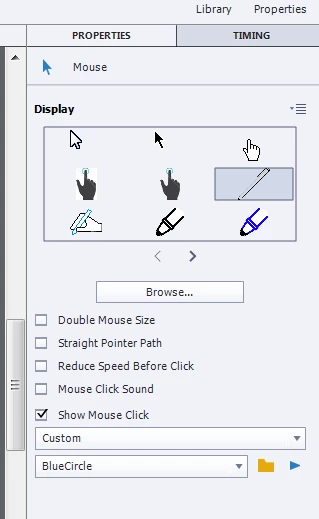
Hi I cam creating a custom mouse cursor.  I uploaded several under Properties.  I can use it, but I wanted to make a change and upload it again.  I can't seem to get it to overwrite the first one and I can't seem to delete the old one.  Any ideas?

Here is a pic of the area...
    This topic has been closed for replies.
    Correct answer RodWard

    I think this will probably turn out to be another one of those cases like custom image buttons and custom text captions where the object gets cached inside the project file.

    Do you have the same issue if you open a brand new CPTX file?  If not, then it's a caching issue.

    Usually we suggest that people debug their designs for these objects using throwaway project files and only use the final versions when building their actual projects.  Adobe did provide an extra button in Properties to fix the issue with buttons and captions but it doesn't look like they thought of doing it here as well for the custom mouse cursors.

    1 reply

    RodWard
    Community Expert
    RodWardCommunity ExpertCorrect answer
    Community Expert
    March 25, 2016

    I think this will probably turn out to be another one of those cases like custom image buttons and custom text captions where the object gets cached inside the project file.

    Do you have the same issue if you open a brand new CPTX file?  If not, then it's a caching issue.

    Usually we suggest that people debug their designs for these objects using throwaway project files and only use the final versions when building their actual projects.  Adobe did provide an extra button in Properties to fix the issue with buttons and captions but it doesn't look like they thought of doing it here as well for the custom mouse cursors.