
Answered
How do I edit a drag and drop action in CP8?
Once the drag-and-drop interaction is created, I cannot open the wizard again. In CP7, it was possible to edit the answers in properties. How do I do it in CP8?
Once the drag-and-drop interaction is created, I cannot open the wizard again. In CP7, it was possible to edit the answers in properties. How do I do it in CP8?
In cp 8 also you can edit the interaction. This you can do the same way as you were doing in Cp7. but you need to have a look in the rearrangement of properties into sections in drag and drop panel in CP8.
I believe you are configuring the DnD interaction through launching the Wizard. After you configure the interaction open "Drag and Drop" panel from the "Window" Menu. Now In the Panel you can see the options to edit the interaction.
For changing the answer matching you need to open "Correct answers" window(which you were finding in DnD properties panel in Cp7)in cp8 you can find this option from the same panel under "Options" Tab section.(as shown in snap shot)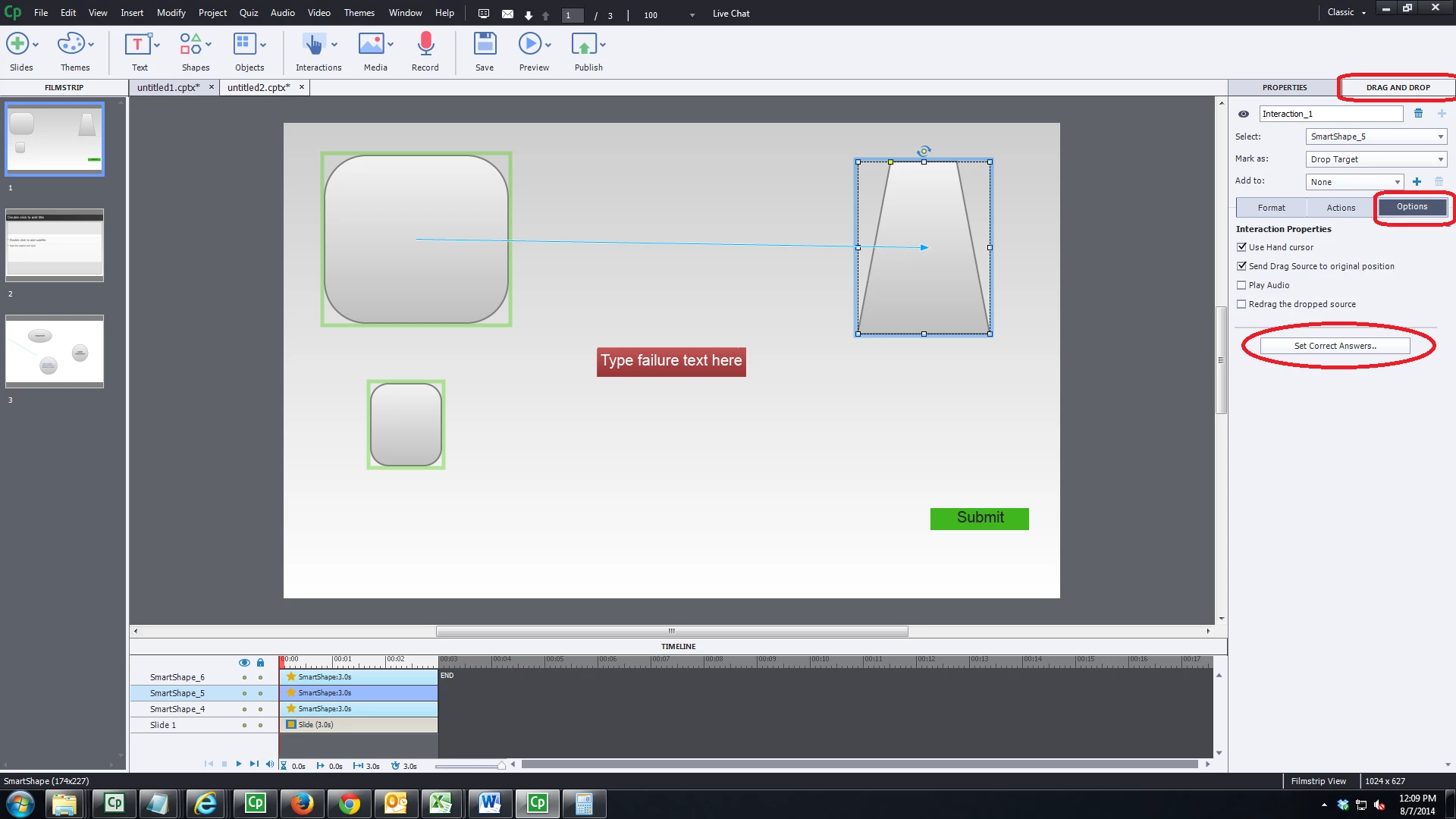
let me know if this resolves your issue.
devraj
Already have an account? Login
Enter your E-mail address. We'll send you an e-mail with instructions to reset your password.
 AdChoices