
Inspiring
November 2, 2015
Answered

How do I make content appear using a button?

  • November 2, 2015
  • 2 replies
  • 1305 views

Good morning, how do I create "hidden" text or objects and have them appear when the user clicks a button? Is it different for an image then it is for, say a text box? I would usually use this type of effect for text.

Thank you!

Tanya
    This topic has been closed for replies.
    Correct answer Captiv8r

    Hi there

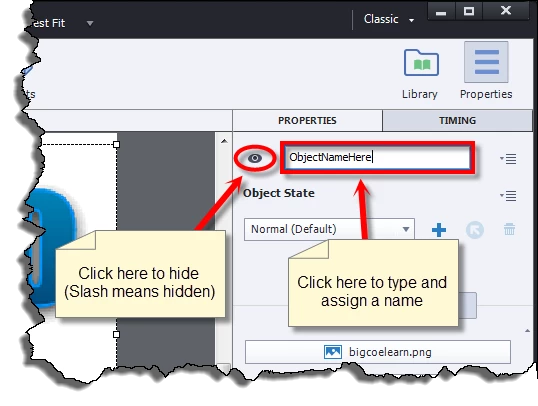
    Pretty much anything you see in Captivate is known as an "object". And pretty much across the board, you are able to hide an object as well as name it.

    Once you have hidden and named an object, you then create Advanced Actions to manipulate them. (Hiding them, Showing them, etc)

    You click Project > Advanced Actions to begin that process.

    Once you have created an Advanced Action, you then assign it to the Button so that when it has been clicked, the action(s) are carried out.

    Cheers... Rick

    2 replies

    Inspiring
    November 2, 2015

    Thank you - that worked!! Do you know, however, if you can do this with objects other than a button? So, for instance, as seen below, it would be a lot better if I could make the text appear when the student clicks on the letter instead of having a button.

    Lilybiri
    Legend
    November 2, 2015

    Any interactive object can trigger actions, simple, shared or advanced. You could put a click box over the letter but (of course Rick) I would recommend using a Shape button filled with the image of that letter, the way i explained in this post:

    Turn an Image into a Button - Captivate blog

    Be aware that what you do show will remain visible until you hide it again. That could be an issue if you come back to the original slide and want it to be in the state without the explanation visible. You didn't tell which version you are using?

    Captiv8r
    Legend
    November 2, 2015

    Please enlighten us on exactly why in this specific instance you would elect to use a shape?

    Captiv8r
    Captiv8rCorrect answer
    Legend
    November 2, 2015

    Hi there

    Pretty much anything you see in Captivate is known as an "object". And pretty much across the board, you are able to hide an object as well as name it.

    Once you have hidden and named an object, you then create Advanced Actions to manipulate them. (Hiding them, Showing them, etc)

    You click Project > Advanced Actions to begin that process.

    Once you have created an Advanced Action, you then assign it to the Button so that when it has been clicked, the action(s) are carried out.

    Cheers... Rick