
Known Participant
July 30, 2017
Answered

How do I prevent transparent button label alignment changes in rollover and down states?

  • July 30, 2017
  • 1 reply
  • 1399 views

In Captivate 9, I use transparent buttons quite a bit. (I'm currently using Captivate version 9.0.2.437.) I want the button label text to remain centered in all states. In many instances, however, the label text alignment in the rollover and down states shifts to the right or left. (See State View image below.)
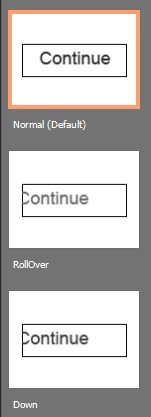
How do I keep this from happening? I know I can change the alignment by going into State View, resetting the rollover state, changing the font and font size back to what it was, and then repeating for the down state, but that's very time-consuming when I have a lot of these buttons, and shouldn't be necessary.

This looks like a bug to me. I can copy a button that has no alignment issues and paste it in another slide, and the pasted button now has alignment issues.

How can I create a transparent button, or copy and paste one, and have the text alignment of all three states remain centered?

-Stuart

This topic has been closed for replies.
Correct answer Lilybiri

Never use copy/paste for mutlistate objects, that so common work flow has cause already multiple problems.

The way to define  button styles has changed between CP9 and previous versions since 9 introduced the multistate objects. Is this a button that has been upgraded from a previous version? If yes, please create its object style in the present version. Also check the exact version number, should be 9.0.2.437.

1 reply

Lilybiri
LilybiriCorrect answer
Legend
July 30, 2017

Never use copy/paste for mutlistate objects, that so common work flow has cause already multiple problems.

The way to define  button styles has changed between CP9 and previous versions since 9 introduced the multistate objects. Is this a button that has been upgraded from a previous version? If yes, please create its object style in the present version. Also check the exact version number, should be 9.0.2.437.

EilmerAuthor
Known Participant
July 30, 2017

Thanks for the reply. To answer your question, this is a button created in my current version, which is 9.0.2.437.

Is this alignment issue a bug that you know of?

I'll proceed by creating the button from scratch each time, rather than by copying and pasting, and I'll see how that works.

-Stuart

Lilybiri
Legend
July 30, 2017

Create an object style, or edit the existing default style for transparent buttons. That can be done in different ways: either in the OSM or by styling one transparent button and saving its style as default style for transparent buttons.:

I used the same version, never had the issue you describe (just double-checked). That is why I suspect this is a leftover of an older version. Did you have a previous version installed before 9.0.2.437, did you follow the release notes when installing versions, patch?