
Known Participant
January 20, 2016
Answered

How do I publish Captivate 9 to a web server?

  • January 20, 2016
  • 2 replies
  • 2905 views

I placed the project in my local disk (as recommended from this discussion) but when search the address in a browser it says the file could not be located. Is there a special procedure for uploading Captivate projects to a web server?

Robert
    This topic has been closed for replies.
    Correct answer Cozmicone

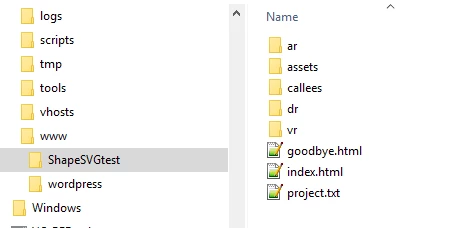
    As Lilybri mentioned, you need to upload the whole folder to maintain the entire hierarchy.

    The image below shows a project I published locally. The folder on the left, ShapeSVGtest, is what you would upload so all the files inside it remain exactly as the appear when published.

    2 replies

    Participant
    April 27, 2017

    This is still not working for us...Can someone post clear step by step instructions on how to upload successfully to the FTP site.  We've worked with two other rapid eLearning tools and have found them to be much easier.

    RodWard
    Community Expert
    Community Expert
    April 28, 2017

    Are you uploading to a web server or to an LMS?

    Inspiring
    January 20, 2016

    No special procedure needed. Captivate has a default location for when it publishes to your computer. If you're still using the default location you need to navigate to this folder, which you can find by selecting Edit > Preferences and looking at the location specified in the General Settings as Publish At. Then you upload the files to your server either through an FTP application or directly through an LMS if that's what you're using.

    idrob2001Author
    Known Participant
    January 21, 2016

    Hi Cozmiccone,

    Because Captivate published folder has multiple subfolders and documents within, are these files normally transferred individually? Also do they have to organized in a special way in the web server?

    Robert

    Lilybiri
    Legend
    January 21, 2016

    You need to keep the hierarchy of the files.