

rgurule
Inspiring
August 8, 2017
Question

How do I put an image on top of a text box?

  • August 8, 2017
  • 1 reply
  • 636 views

Here is what the corner of my text box looks like in the editor.
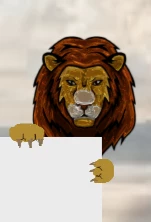
When I preview in the browser, the claws are hidden. It looks like this:
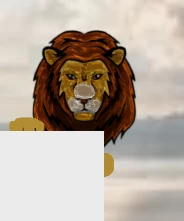
I manually deleted the bottom of the lion's beard so that it doesn't show. But the claws should show.

This topic has been closed for replies.

1 reply

Lilybiri
Legend
August 8, 2017

This is a normal behavior since you layered the white shape on top of the image.

My approach would be to edit the image, and add the white rectangle to the image in the graphics editor. It depends on the way that image has been layered, you'll need some masking.

In Captivate you can add the text by using a shape that has a transparent fill (alpha set to 0%) and no stroke.

rgurule
rguruleAuthor
Inspiring
August 8, 2017

Thanks for the reply Lily. In this case, the image is already layered on top of the box. The box is a text entry box that prompts user input. Is this some type of special text entry box behavior that automatically renders it to the top layer?

Nevertheless, I'll try your approach in the graphics editor.

Lilybiri
Legend
August 8, 2017

Again a terminology confusion! Some users indicate a text container (shape or caption) as a 'text box', and you meant a Text Entry Box.

That is indeed a different situation, did you set the Alpha for the fill of the TEB to 0?