

edh91988803
Participating Frequently
November 25, 2015
Question

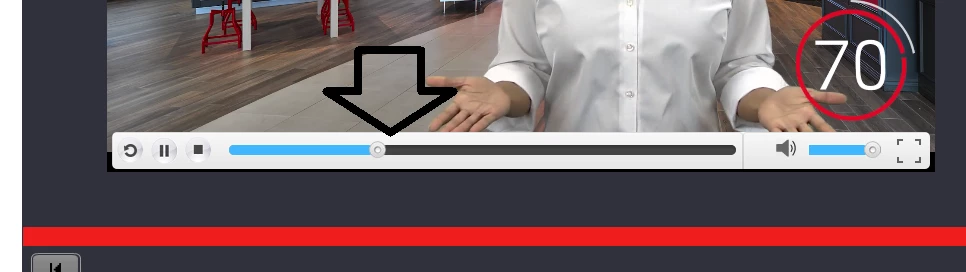
How do I remove the video progress bar, so users can't skip ahead?

  • November 25, 2015
  • 4 replies
  • 4095 views

How do I remove the video progress bar, so users can't skip ahead?

    This topic has been closed for replies.

    4 replies

    Paul Wilson CTDP
    Community Expert
    Community Expert
    October 9, 2019

    In this case, you are using Event Video, which is a little different. There are a series of skins available for you to select. These skins are a throwback to the SWF day of Adobe Captivate. Regardless of which skin you choose you will always see the same skin in HTML5 output like your screenshot above. My advice is to remove the play bar entirely so that learners will not be able to skip forward.

    If you need to give your learners some of the controls, you can do so with Javascript commands and buttons of your design. Take a look at this video where I do exactly that.

    Adobe Captivate - Control Event Video with JavaScript


    Paul Wilson, CTDP
    BDuckWorks
    Inspiring
    November 25, 2015

    Where does the video come from?

    How was it inserted to Captivate?

    If it's a YouTube video you can explore their site to find a way to customize the embed code so there is no playback control.

    edh91988803
    Participating Frequently
    November 25, 2015

    The video is a MP4 and located on my desktop.  In Captivate, I click on Media, and the box below appears.  That's how I add it.

    daniela.simson@accenture.com
    Participant
    October 9, 2019
    Hi! Did you find the way to remove it? I have the same issue
    Known Participant
    November 25, 2015

    Hello,

    1. Click Project.
    2. Select Skin Editor
      1. Uncheck Show Playback Control
    3. Click the Frames Icon
      • Uncheck Show Boarders
      edh91988803
      Participating Frequently
      November 25, 2015

      Thanks, but this doesn't seem to work.  If I uncheck "Show Playback Control," it removed the playback control from the slide, but it still remains in the video.    Show borders is also unchecked, and it is greyed out as well.  Any other suggestions?

      TLCMediaDesign
      Inspiring
      November 25, 2015

      Do what I said

      TLCMediaDesign
      Inspiring
      November 25, 2015

      Choose a different skin in the properties panel.