January 18, 2011
Question

How do I use a Menu Slide w/ buttons that play a set number of slides & return to the menu
  • January 18, 2011
  • 2 replies
  • 453 views

Captivate 5

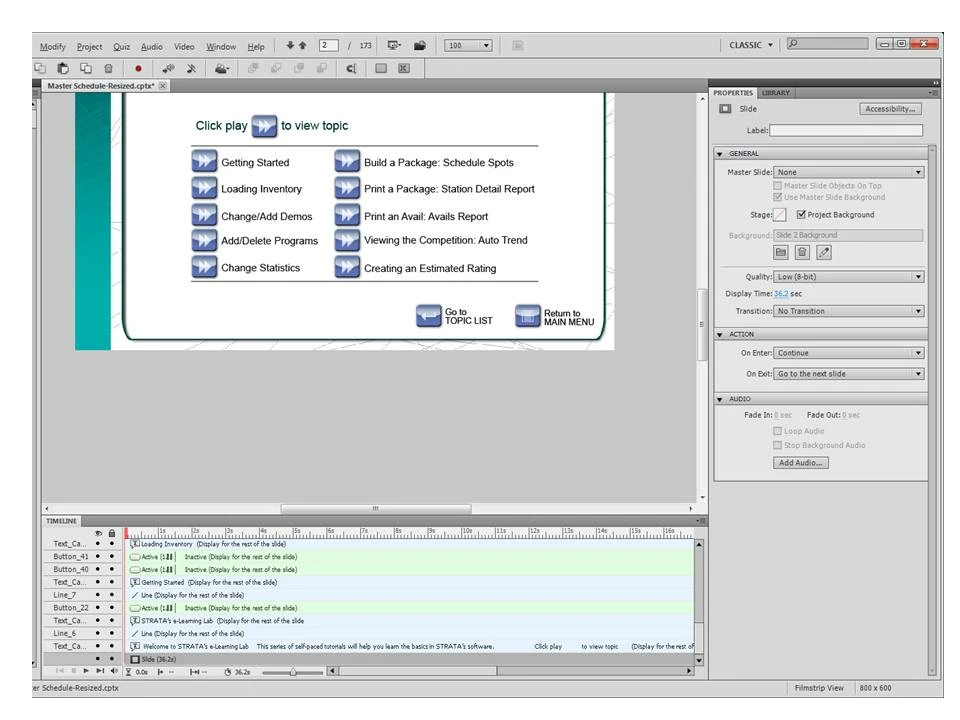
I've created a menu slide w/ buttons to advance users to a specific topic within a large, multi-topic presentation.  The idea is, they can either view the entire presentation from beginning to end/in order, or go to the menu slide & choose an individual topic.  The individual topics are listed & each has a button next to them so the user can click to play that topic.  It's basically just set to "jump to slide" - and advance to the slide number. 

When the user clicks the specific topic, I ONLY want the slides for that topic to play & at the end, return to the Menu slide.  For example:  The user clicks on the button next to "Getting Started" &  they are taken to slide 43, where that topic is covered.  The topic is covered from slides 43  through 59, and then a new topic begins.  I don't want them to continue to the next topic.  I want them to only see slides 43-59 & automatically return to the Menu slide after slide 59.  Is this possible?

    This topic has been closed for replies.

    2 replies

    Lilybiri
    Legend
    January 18, 2011

    Hello and welcome to the forum,

    If it is only jump actions you want, this could indeed easily be done with actions on Exit slide. If you want to try Advanced actions, perhaps some of the articles I published about advanced actions could help you. Mostly I provide a startfile for practicing. Here is one example:

    Create customized menu

    In my blog you can find other links to articles and tips, here is an example:

    Customize your quiz

    Lilybiri

    RodWard
    Community Expert
    Community Expert
    January 18, 2011

    It depends how fancy you want to get.

    The easiest way to achieve this is to do as you currently have, but set the On Exit action for the final slide in each group to jump back to the Menu slide.

    In order to give the user the option of continuing on to the next slide, you can place a button on the final slide of each group and set it's action to jump to the first slide of the next group.  You need to set up some variables and Advanced Actions to show/hide this button depending on whether or not the user has clicked the button on the menu to view all slides.  If they've just clicked the button for a particular group, the Continue button remains hidden and they'll be jumped back to the menu.  The disadvantage of this method is that it requires the user to click something at the end of each group to continue to the next.

    If you want the user make their choice on the menu slide to play all sections one after the other, and then to be seamlessly taken to each new group without clicking anything, then you need to get slightly fancier with your Variables and Advanced Actions.  Basically, On Exit of the final slide in each group, instead of the action to jump back to the menu, you need to have it perform a check to see what the value of the variable is that determines whether to continue or not.  If the variable is 1 (to indicate continuous play), then it will jump to the beginning slide of the next group.  If the variable is 0, then it should jump back to the menu.

    If you're unfamiliar with Captivate Advanced Actions and user variables, this is your opportunity to learn!