
Inspiring
February 20, 2019
Question

How do you get Buttons and Click Boxes for quiz slides to work?

  • February 20, 2019
  • 14 replies
  • 1539 views

I've been trying to get the buttons and click boxes to work and went through lots of articles and videos but none has helped so far. I've been trying to make them myself and using pre-made slides but nothing is working.

Right now, I'm stuck on a video where you need to add these elements as variables. Then advanced actions is supposed to show up in the Actions section. But, in my case, the Advanced actions is not showing up. Any ideas?
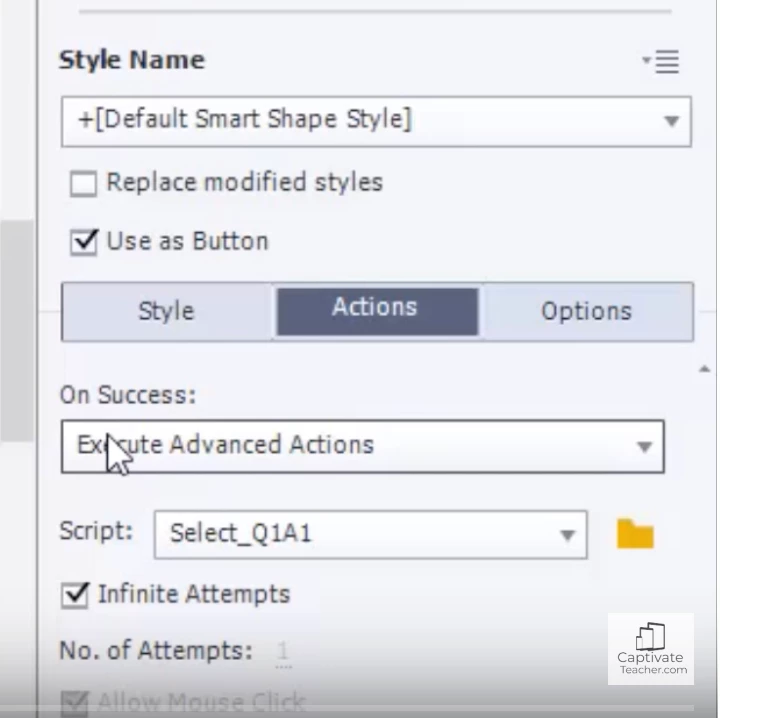
This is the area that I don't see on my captivate.. "On Success" or the "script".

I've tried copying templates and using the templates but none of them work. This really can't be that difficult.

I need to make 4 questions:

T/F

Multiple choice

Matching

I can't even get elearning brothers templates to work or for them to contact me. So any help would be appreciated.

Thanks!

    This topic is closed to new replies. Start a new post to keep the conversation going.

    14 replies

    Lilybiri
    Legend
    February 20, 2019

    Are you totally new to Captivate? Which version do you use please?

    If you want a quiz slide, use the Quiz Menu, Question slide. A dialog box will open where you can indicate which type of question (s) you want. You can insert all of them at once. They will be based on the quizzing master slides.

    Just started a series of blogs about Quizzes. Only two are posted at this moment:

    Captivate's Quizzes (1): Terminology - eLearning

    Captivate's Quizzes (2): Submit Process - eLearning

    I don't know why you want to create manually a quiz slide, when they are available out of the box.

    Inspiring
    February 20, 2019

    I'm using Captivate 2019. I'm not totally new to Captivate, I've been using it for 3 years. I don't add more than just a few buttons. But so far none of the instuctional information is matching up with what I'm trying to do. I've read and watched dozens and dozens of items. I use master slides all the time except for the quiz items. I've already tried using my master Quiz slides (which are ugly and I can't alter the information that's unnessary on these slides) and they don't work. I tried to build my own and that doesn't work. I've tried importing quiz templates from the assets of eLearning brothers and those don't work. I just need some very quiz slides with no tally report that I can make look better than what the master slides provide. I have already tried altering the master quiz slides and I could still not get them to work by removing all that extra stuff. Some items would not even delete.

    Lilybiri
    Legend
    February 20, 2019

    I have plenty of blogs about custom question slides, but it looks like you are not very familiar with variables nor advanced actions.

    It is perfectly possible to create a custom theme,  which includes object styles and master slides.

    I don't think you did read the blog posts at  all.