Gray Susan
Inspiring
November 29, 2018
Answered

How do you get the Closed Captioning in Captivate 2017 to left justify?

  • November 29, 2018
  • 1 reply
  • 503 views

Just got CP 2017  I'm trying to get the cc to start on the bottom left.  I thought I'd done the settings correctly but when I preview the CC is centered at the bottom.

    This topic has been closed for replies.
    Correct answer RodWard

    Closed Captioning set up became much more complicated with Captivate 2017 and has continued to confuse people.

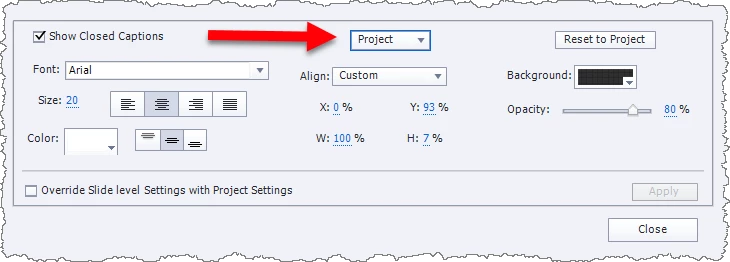
    When making changes to the settings, unless you want the changes to only apply to the current slide, you need to make sure that the drop-down near the top of the dialog is set to PROJECT.  Checking the box to Override Slide Level Settings with Project Settings is also usually a good idea.
    1 reply

    RodWard
    Community Expert
    RodWardCommunity ExpertCorrect answer
    Community Expert
    November 29, 2018

    Closed Captioning set up became much more complicated with Captivate 2017 and has continued to confuse people.

    When making changes to the settings, unless you want the changes to only apply to the current slide, you need to make sure that the drop-down near the top of the dialog is set to PROJECT.  Checking the box to Override Slide Level Settings with Project Settings is also usually a good idea.

    David Burnham HBA
    Inspiring
    November 30, 2018

    Agreed Rob - that is why many of my government clients want their work developed in Captivate 9. They like the simplicity of closed captioning.

    RodWard
    Community Expert
    Community Expert
    November 30, 2018

    Well the interface may be more complicated and confusing, but once you work it out I would have to say that I prefer the ability to control several aspects of Closed Captioning that Captivate 2017 and later give.  So, I think your government clients are missing out.  But then governments are not really about efficiency, are they?