
Graysusan
Inspiring
June 11, 2014
Answered

How do you recover a project from Cache files in CP8

  • June 11, 2014
  • 8 replies
  • 16912 views

I asked earlier about why there are so many cache files that open when you open a project.  In previous versions there was only one for each time you opend a project now there are 7 cache files that appear in the folder when you open a new porject.  How do you recover a project from the cache files in CP8?  I tried a process that Rod Ward had written for earlier versions of CP8 but it didn't work.

Any help would be appreciated.
This topic has been closed for replies.
Correct answer VikramGaur

Hello,

Welcome to Adobe Forums

Under your "My Documents" folder you will see "Adobe Captivate Cached Projects" folder

Under that folder, you will see Alpha-numeric names folder

Check the date modified

Open folder as per your observation

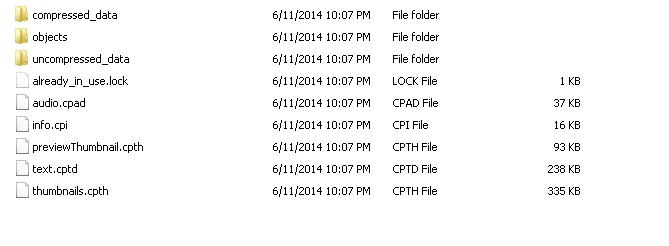
Navigate under "db" then you will see this :

Select all, except "already_in_use.lock" and create a .zip file

Rename the extension from .zip to .cptx

Hope this helps !!

Thanks,

Vikram Gaur

Adobe Support

8 replies

Inspiring
May 1, 2020

I was desperately looking all morning for my updated .cptx file from last year. I must have saved an older version of my project in our repository. Then, a tiny miracle occurred. I looked on PAGE 2!! of the Google search and this procedure, clearly written and easy to follow was right there waiting for me. THANK YOU! I know I'm not the only one that would benefit from these instructions. How do we get them on Page 1 of the Google search??

Participant
March 19, 2018

I have tried the above procedure to zip the files and change the extension to .cptx. When I try and open the file, I get the following message:

I don't think the file is already open (how could I find out?)

The file wasn't an email attachment

There is space on the hard disk

The system has sufficient resources, I've used Captivate many times on the same computer.

Can anyone advise on this?

Thanks.

RodWard
Community Expert
Community Expert
March 20, 2018

You may not have followed the correct procedure.  There is one particular file you must NOT include in the zip file.

Take a look at this article:

http://www.infosemantics.com.au/adobe-captivate-troubleshooting/recover-corrupt-project

teriw38899602
Participant
October 16, 2018

I don't have backups enabled, so I tried to use the dcache.zip file. However, when I try to install the dcache.air i get the following error:

"The application could not be installed because the installer file is damaged. Try obtaining a new installer file from the application author."

Is there another version? Thanks.

Known Participant
May 24, 2017

My computer completely locked up while I was closing Captivate. By all appearances, Captivate had already closed when I initiated a hard reboot. When I tried accessing my project, Captivate wouldn't open it. I tried following the steps above, but all the files listed in the DB folder are listed as 0 KB. ALL of them.

I'm assuming I have to start from scratch, then? No ability to somehow fix the original 50+ K project?

RodWard
Community Expert
Community Expert
May 25, 2017

Did you have Backups turned on?  It sounds like you must have been working on quite a new project and perhaps had not opened and closed it a couple of times or saved frequently.

The cache (if there's anything there) usually only gives you back to the last major Save.

Known Participant
May 25, 2017

No, it wasn't new. I had saved it without problem several times that day before the crash.

I don't know why there is only the cache timed roughly when I reopened the file, but I have nothing in the directory for the saves leading up to the crash. Everything is just gone. The master file is corrupted, the cache has nothing.

Participant
January 10, 2017

Thank you. This was a life saver! Worked for Mac OSX running Captivate 9 -- I just searched my drive for the folder and everything else was exactly the same.

Participant
October 30, 2015

Hi I am having a similar problem. After two days of work on my captivate project (and saving every 10-15 minutes) I tried to save my file today and it crashed during saving. Somehow I lost all my work that I had performed since yesterday at lunch time (so I estimate I lost about 10 hours of work), but did not lose the entire project.

Is there any way to recover the file I was working on? I have tried the steps listed above but they have not worked. I also called Adobe Support, they basically just told me to ensure I have backups enabled for future.

Using the Adobe AIR solution found online also did not help

I have cached files from the time my project crashed. Is there anything else I can do with this? I really need to get this fixed asap I have a deadline in work approaching.

tpriddlenew
Known Participant
May 17, 2017

Had the same issue today after finally updating to the latest version of 9. File which was saved before hitting update is reverting back to a version from yesterday, yet cache showing work from today.  Have attempted to zip / rename the db cached file but it appears corrupted and won't load.

File which was saved before hitting update is reverting back to a version from yesterday, yet cache files showing work from today. When opening db.cptx (which is a very small filesize considering the original project) it won't open, yet dummy recordings that I was working on will.

Frustrating as I've lost 4-6 hours work, not the end of the world to rebuild thankfully but provides me nightmares from working with 5.5/6 which used to undertake similar behaviours!  Also note that when I've opened the update, generate project backup has become unticked. Something for others to keep in mind before updating to new versions....

Participating Frequently
July 4, 2015

I have in cached folder my project folder but in the folder I do not have thumbnails files (2 of them). I have all of the above mentioned plus backup data folder. How do I restore my project? Cap 8 crashed in middle of working.

RodWard
Community Expert
Community Expert
July 5, 2015

I hope by what you said above that you DO NOT mean you have placed your project CPTX files inside the project cache folder.  Because if you DO that you will eventually lose all of your work when you next try to clear out your cache.

If your CPTX files are in a totally different folder then fine.

One reason I have noticed for Captivate 8 creating different folders for the same project inside the cache is that every time you call up the Preferences dialog it will spawn a new project folder version in the cache.  Personally I think this is probably a Captivate bug.

Participating Frequently
July 5, 2015

I havent touched anything in any folder. I was working and then Captivate

crashed. I try to open it again hoping it will give me recent, but nothing.

Then I found this forum post and went on to check cahed folder. I see that

my project is there, I see all the correct dates and hours meaning my

project is there, but I do not know how to open it from cached folder. And

in the folder cached ds I do not have these two files thumbnails, all the

rest is there. So, what is the point of cached folder and saved files when

captivate cant open them?

For this time my solution was work all night long and redue the project

from scrach but I wont do that forever so is there any solution? Or should

I just make mental note to click save every 10 minutes when working with

captivate?

Marina Matic

Univ. spec. maritime nautics

Consultant for development and education

Mob: 00385 99 2659109

Graysusan
GraysusanAuthor
Inspiring
July 11, 2014

Turns out when i passed these steps on to anothe user they didn't work for him.  Here is his response.

"I  opened the CP8 and all 8files have the same date and I checked 5 and none have the already_in_use file."

My big question is why are so many cache files made for just aone project?

VikramGaur
Adobe Employee
Adobe Employee
July 16, 2014

Changes you made on your project with every Adobe Captivate 8 launch creates different folders under cache location

Thanks,

Vikram

RodWard
Community Expert
Community Expert
July 16, 2014

Vikram,

Is this behaviour (creating different folders in the cache for each project file launch) the same as in previous Captivate versions or only since Cp8 came out?

VikramGaur
Adobe Employee
VikramGaurCorrect answer
Adobe Employee
June 11, 2014

Hello,

Welcome to Adobe Forums

Under your "My Documents" folder you will see "Adobe Captivate Cached Projects" folder

Under that folder, you will see Alpha-numeric names folder

Check the date modified

Open folder as per your observation

Navigate under "db" then you will see this :

Select all, except "already_in_use.lock" and create a .zip file

Rename the extension from .zip to .cptx

Hope this helps !!

Thanks,

Vikram Gaur

Adobe Support

Participant
January 8, 2018

Vikram! you saved me! thank you!!!