Dexter2012
Known Participant
March 11, 2023
Answered

How to activate the next button by clicking any 1 button from 2 different groups.

  • March 11, 2023
  • 1 reply
  • 650 views

Hello
Good Morning/Good Evening,


Sorry for the trouble.  Tried to solve the problem, but couldn't solve. That is why reached out.


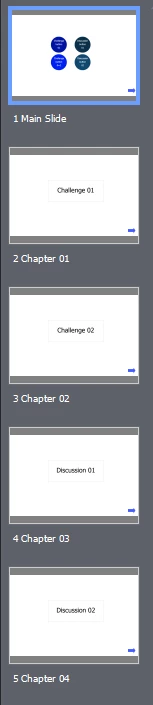
There is a scenario in a captivate with the diferent topics/groups.
1) Challenge
2) Discussion


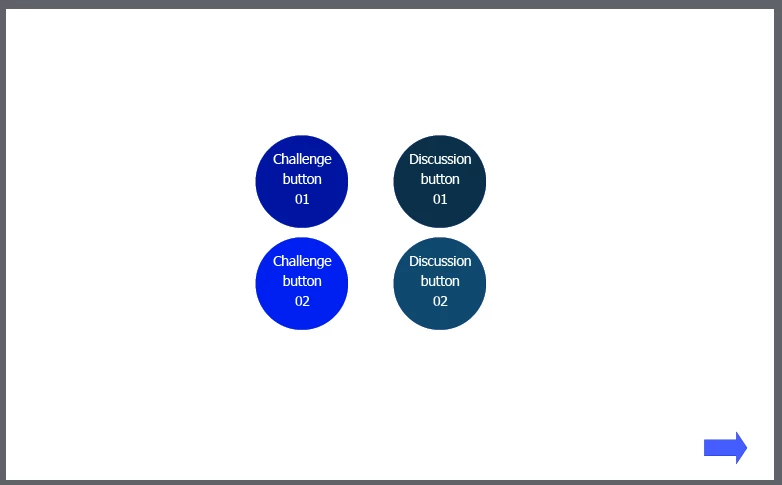
There are two buttons in challenge group & two buttons in discussion group, in "Challenge" group, out of 2 buttons any 1 button should be clicked & in "Discussion" group, out of 2 buttons any 1 button should be clicked to activate the next button on the main slide.


If the learner click the two buttons from the same group then the next button should not activate/appear.


Challenge button 1 will jump to chapter 1, Challenge button 2 will jump to chapter 2
Discussion button 1 will jump to chapter 3, Discussion button 4 will jump to chapter 4.


Is there any advanced action to solve this problem?
    This topic has been closed for replies.
    Correct answer Lilybiri

    As promised I will give you a replacement for the On Enter event of the main slide action. However allow me to give my opinion as 'eternal/obstinate' teacher: I find it a bit frustrating for a learner to see a button which cannot be clicked, reason why I would prefer to hide.show the button.

    This will be the new conditional action

     IF v_1 is equal to 1 AND

            v_2 is equal to 1

       Enable Bt_Next       

    ELSE

        Disable Bt_Next

    1 reply

    Lilybiri
    Legend
    March 11, 2023

    I assume that the learner can click the same button twice as well? In that case I would create two user variables:

    • v_1 (for first group) and
    • v_2 for second group

    Replace the Jump to slide command of the group buttons by a shared action:

         Assign v_1 with 1                  v_1 would be first parameter for shared action
         Jump to chapter 1                 chapter 1 which is first slide of chapter 1 is second parameter

    Parameters for the other buttons:

      Second button first group: v_1 and chapter 2

      First button second group: v_2 and chapter 3

      Second button second group: v_2 and chapter 4

    If you prefer advanced actions you'll need 3 duplicate advanced actions with similar editing.

    Create a conditional advanced action to be triggered by the On Enter event of the main slide:

       IF v_1 is equal to 1 AND

            v_2 is equal to 1

       Show Bt_Next              

    I assume here that this Next button is set to Invisible in Output.

    If you prefer to have the Next button visible from the start but disabled, it would be a little bit more complicated, let me know and I'll write out the workflow.


    Dexter2012
    Known Participant
    March 11, 2023

    Thank you mam for the solution! I'll try it.
    Yes, the learner can click the same button twice. My apologies that I didn't give the proper instruction about next button. Next button will be hidden from start. 

    But would prefer the next button being visible from start but disabled from start. Mam if you share the workflow for the next button being visible but disabled from start. I will save it for future reference. Pls take your time mam.

    Lilybiri
    LilybiriCorrect answer
    Legend
    March 11, 2023

    As promised I will give you a replacement for the On Enter event of the main slide action. However allow me to give my opinion as 'eternal/obstinate' teacher: I find it a bit frustrating for a learner to see a button which cannot be clicked, reason why I would prefer to hide.show the button.

    This will be the new conditional action

     IF v_1 is equal to 1 AND

            v_2 is equal to 1

       Enable Bt_Next       

    ELSE

        Disable Bt_Next