Known Participant
August 8, 2017
Answered

How to adjust the position of the checkmark/cross icon - Review Quiz questions

  • August 8, 2017
  • 2 replies
  • 468 views

Hello guys good day,

I am having issues regarding on the checkmark/cross icons appears when you Review the Questions like the image below.
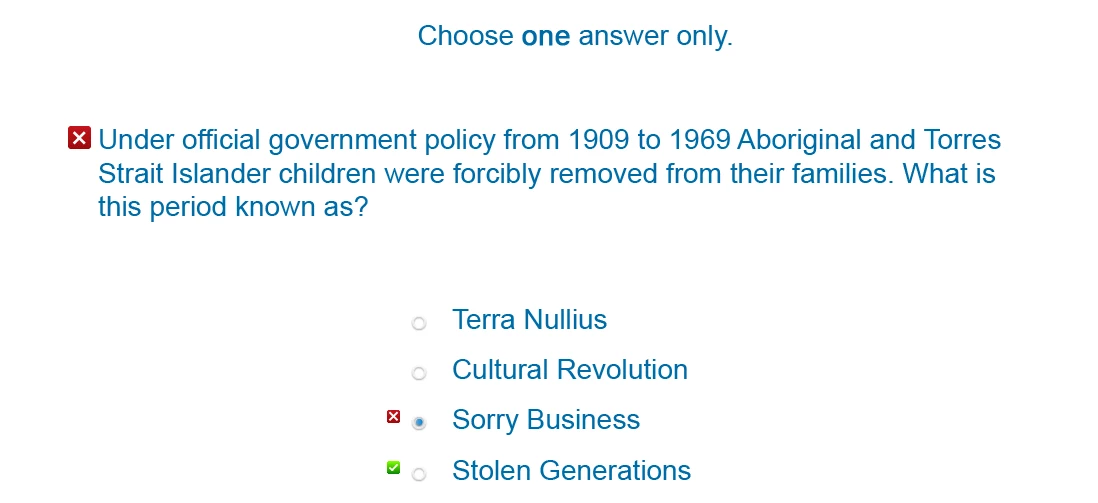
How is it possible to customize the position of the icons (the green and the red)?

Another question: Is it possible to add a hover effect on the quiz buttons?

BTW I am using the Captivate 9 version

    This topic has been closed for replies.
    Correct answer Lilybiri

    You can replace the icons by other icons, but I don't know how to change the position.

    As for your second question: please tell which version you are using? At this moment the quiz buttons can only use the three old types of buttons: transparent, text and image. There is no way to use shape buttons. Most included Captivate themes are using transparent buttons. Those buttons can have InBuilt states since a couple of versions, but the rollover and down states do not show up on quiz slides in Captivate 9, they do in Captivate 2017. The only way to have a rollover effect in CP9 is to replace the transparent buttons by image buttons.

    2 replies

    en6geh77Author
    Known Participant
    August 8, 2017

    I am using Captivate 9 version 9.0.2.437. I will try to use the Captivate 2017 to know more about the limitation of the Quiz and hopefully they will also update the CP9 to get the states of the button on the quiz section.

    Thank you

    The icons position are kinda hard to adjust specially when using bigger fonts. lol

    Lilybiri
    Legend
    August 8, 2017

    Don't expect an update to CP9. I gave you the solution to have hover: replace the transparent buttons by image buttons.

    en6geh77Author
    Known Participant
    October 27, 2017

    my bad for not marking this as done.

    Lilybiri
    LilybiriCorrect answer
    Legend
    August 8, 2017

    You can replace the icons by other icons, but I don't know how to change the position.

    As for your second question: please tell which version you are using? At this moment the quiz buttons can only use the three old types of buttons: transparent, text and image. There is no way to use shape buttons. Most included Captivate themes are using transparent buttons. Those buttons can have InBuilt states since a couple of versions, but the rollover and down states do not show up on quiz slides in Captivate 9, they do in Captivate 2017. The only way to have a rollover effect in CP9 is to replace the transparent buttons by image buttons.