
leslir88015244
Participant
January 3, 2018
Answered

How to change Closed Caption styles

  • January 3, 2018
  • 1 reply
  • 1240 views

I'm having a heck of a time figuring out how to change the global style for Closed Captions in Captivate 2017. Although I'm familiar with changing other styles, I cannot find where to change closed caption font and background defaults. Currently, I'm changing it within each Closed Caption, which is not very efficient! Thanks in advance.
This topic has been closed for replies.
Correct answer Lilybiri

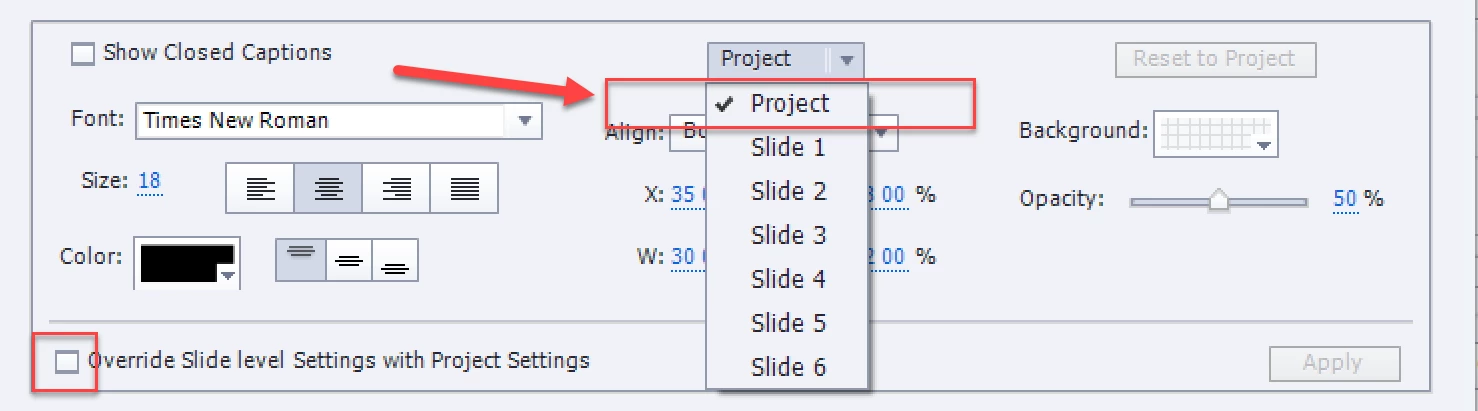
Why not set the style for the Project?

1 reply

Paul Wilson CTDP
Community Expert
Community Expert
January 3, 2018

This video might help you out...

https://youtu.be/9NCjGxGZvl4

Paul Wilson, CTDP
leslir88015244
Participant
January 3, 2018

Thank you Paul. The video was helpful, however, I want to make these changes to all closed captions in the video. I want to change the background color, font and opacity. Is there a way to do this globally? I'm trying to avoid having to open each Closed Caption dialog and changing each slide manually. Is there an object that I can edit in the Object Style Manager that would accomplish any of the changes I'm looking for? Thanks.

Lilybiri
LilybiriCorrect answer
Legend
January 3, 2018

Why not set the style for the Project?