Participant
February 4, 2018
解決済み

How to change text size and position during slide-Captivate 2017

  • February 4, 2018
  • 返信数 1.
  • 264 ビュー

Hi,

I would like the text on my slide to appear large and centre aligned. After a certain period of time, I want it to shrink and move to the upper left corner until the end of the slide. Is this possible?

Thanks!

このトピックへの返信は締め切られました。
解決に役立った回答 Lilybiri

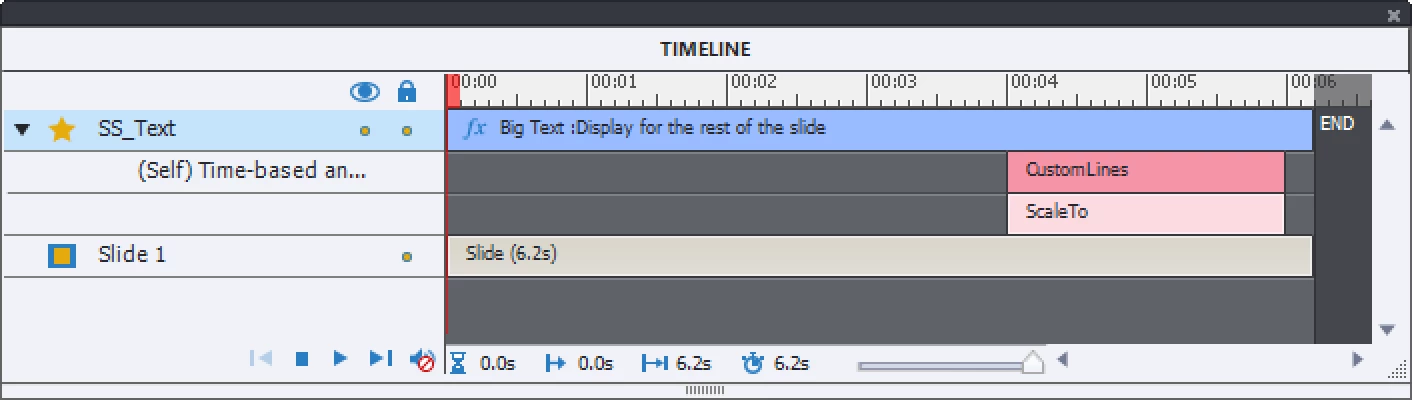
Yes, by adding two effects to the text container. I could propose Scale to (Basic category) combined with a Motion paht. Time the effects as wanted with the timeline. Will look like this:

返信数 1

Lilybiri
Lilybiri解決!
Legend
February 4, 2018

Yes, by adding two effects to the text container. I could propose Scale to (Basic category) combined with a Motion paht. Time the effects as wanted with the timeline. Will look like this:

Participant
February 4, 2018

Thank you very much, Lilybiri, for such quick response. I have tried what you suggested and it works perfectly! I've only started using Captivate recently and was unaware that "scale to" could be used to decrease size. Thanks again!!

Lilybiri
Legend
February 4, 2018

You'te welcome and success with Captivate!