Inspiring
March 9, 2015
Answered

How to change the formatting of all text captions in a project?

  • March 9, 2015
  • 1 reply
  • 359 views

Hi there.


I'm wanting to change the following formatting options on all text captions in my projects:


Caption type

Font

Font size

Font colour

Spacing


Is there any way of changing these for all text captions, or do I have to change them individually? I've tried changing the options in the object style manager, but I think that only works for when you're creating a new text caption, not for existing ones.


I'm using Captivate 7.


Thanks.
This topic has been closed for replies.
Correct answer Lilybiri

It depends: are you using the default style for Text Captions? In that case you can change the default style in the Object Style Manager and have it applied to all Captions.

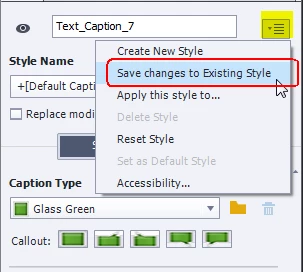
Or you can change one text caption, and in its Properties panel choose the option 'Save Changes to existing style' from the menu top right (see screenshot). Both methods will work if you didn't override the default Caption Style for those captions. Beware: Quizzing objects can use another style.

1 reply

Lilybiri
LilybiriCorrect answer
Legend
March 9, 2015

It depends: are you using the default style for Text Captions? In that case you can change the default style in the Object Style Manager and have it applied to all Captions.

Or you can change one text caption, and in its Properties panel choose the option 'Save Changes to existing style' from the menu top right (see screenshot). Both methods will work if you didn't override the default Caption Style for those captions. Beware: Quizzing objects can use another style.