stever72240430
Known Participant
March 20, 2018
Answered

How to Create Smart Shape Captions with a Dropshadow

  • March 20, 2018
  • 1 reply
  • 247 views

Hi,

I produce software sims for the software company I work for.  I have developed a custom template that utilizes Smart Shapes for captions, and a custom Failure shape and highlight.

I record my sims in the Training mode, and the Smart Shapes I created work fine.  But, what I wished I could do is have a drop shadow for the Smart Shape. I know I can assign a drop shadow after the screens are recorded, but it there a way to automate this from the Object Style Manager or other means?
    This topic has been closed for replies.
    Correct answer Lilybiri

    Shadow nor reflection are part of an object style.

    However you can use this workflow:

    • Add a shadow to one of the shapes (caption is another type of object) used as text container
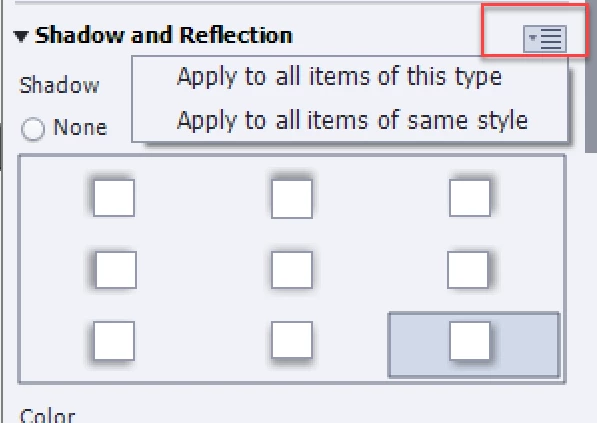
    • Open the hamburger menu and choose the Appropriiate option (if you use consstenstly styles, use '...same style'

    1 reply

    Lilybiri
    LilybiriCorrect answer
    Legend
    March 20, 2018

    Shadow nor reflection are part of an object style.

    However you can use this workflow:

    • Add a shadow to one of the shapes (caption is another type of object) used as text container
    • Open the hamburger menu and choose the Appropriiate option (if you use consstenstly styles, use '...same style'