Participant
March 23, 2010
Question

how to delete number in "fill in the blank"

  • March 23, 2010
  • 3 replies
  • 677 views

i'd like to delete the number in front of the rectangular.
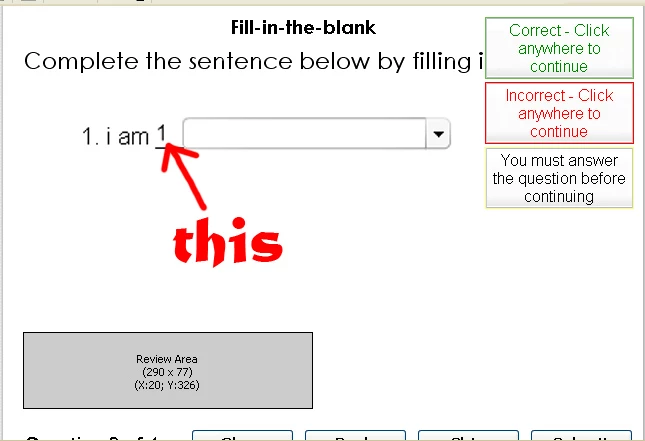
thank you for your answer

    This topic has been closed for replies.

    3 replies

    riranaAuthor
    Participant
    March 24, 2010

    Thanks everybody for giving your instructions.

    but i still can't solve my problem.

    due to your instructions, rgcunningham

    i 've already tried but the number still appears.

    In edit view :

    In preview :


    For your instructions, Captiv8r

    i didn't find "Hide numbering"

    Now i'm using Captivate 3, how can i do?

    look forward to seeing another advice

    with lots of thanks

    Captiv8r
    Legend
    March 24, 2010

    Hi there

    I did preface my post with saying "if you have Captivate 4".

    Short of exporting the Captivate project to Flash, I don't believe there is much you can do. Even then, I'm not certain you would be able to remove the numbering. But it may be possible.

    Cheers... Rick

    Helpful and Handy Links

    Captivate Wish Form/Bug Reporting Form

    Adobe Certified Captivate Training

    SorcerStone Blog

    Captivate eBooks

    Inspiring
    March 23, 2010

    But is it not true that the number displays only in the edit view?  I think when you preview or publish the project, the number should not appear.

    In Edit view:

    But in Preview:

    Mister C.

    Inspiring
    March 23, 2010

    @ Mister C,

    Haha - never thought of checking it in actual preview mode but you are 100% correct;o)

    /Michael


    Visit my Captivate blog with tips & tricks, tutorials and Widgets.

    Inspiring
    March 23, 2010

    Unfortunately I don't think that is possible. It's an "integrated" part of the text entry box in a fill in the blank question.

    /Michael


    Visit my Captivate blog with tips & tricks, tutorials and Widgets.