
Participating Frequently
March 23, 2016
Answered

How to Download Captivate Update (No "Update" in Help menu!)
  • March 23, 2016
  • 1 reply
  • 969 views

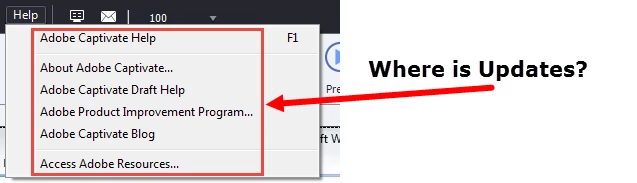
I want to update my Captivate but there's no "update" in my help menu.

According to the documentation I click on "update" and I download the file.  But I don't see "update" in my help menu. (See graphic).

    This topic has been closed for replies.
    Correct answer Sreekanth_S

    Ran it.

    Still no Update in the Help menu


    Install Adobe Application Manager from here and run it to check for updates. It must list the available Captivate update. You can install it from there.

    Adobe - Adobe Application Manager : For Windows

    Alternatively, you can download the patch from here as well.

    Adobe - Adobe Captivate Support Center : Downloads

    Sreekanth

    1 reply

    Lilybiri
    Legend
    March 23, 2016

    Do you have administrator rights?

    Bobby MakAuthor
    Participating Frequently
    March 23, 2016

    Yes.  This is my pc at home.

    Lilybiri
    Legend
    March 23, 2016

    Is it a Win system? Do you Run Captivate as Adminsitrator? Use the right-click menu on the Captivate launch icon to achieve that.