
Known Participant
December 1, 2015
Answered

How to embbed PDF without forcing my student to leave the course?

  • December 1, 2015
  • 1 reply
  • 704 views

Hello community,

I currently upload my Captivate course as na HTML in a moodle platform, as a file resource, so when the user access it, the course uses a pop up scalabe window.

I've put a PDF in my course for download, say in slide 8 of 12. So that my student can keep it for him in his computer for later studies.

The PDF is opening correctly BUT, instead of using a pop up window, it takes the Course window, forcing the student to leave it.

Anyone knows how to fix this? At the moment I've moved it to my final slide, but that's not my desired outcome.
This topic has been closed for replies.
Correct answer Lilybiri

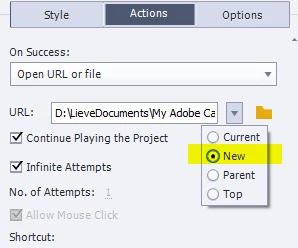
Is this your set up, did you click that down-pointing arrow?:

1 reply

Lilybiri
LilybiriCorrect answer
Legend
December 1, 2015

Is this your set up, did you click that down-pointing arrow?:

Known Participant
December 1, 2015

Yes I found it a little later.

Thanks again Lilybiri!

Just sharing a bit about the case:

It worked. but the actual course window is minimized and the PDF opened in a new tab of my Moodle browser window. Not really an issue, I was just worried students that are not familiarized with computers would'nt notice the course being minimized. I've added a narration clarifying it.

Known Participant
December 1, 2015

Hi Gustavo and Lilybiri,

I would like my course to do something similar. The user clicks on a button and a url opens on a new IE window. Why have you checked Continue Playing the Project? I have not been able to see the opened page when I publish my course. Is that because it needs to be housed on a web server?

Thanks!