


kellies50617532
Inspiring
July 20, 2016
Answered

How to exit Background Audio?

  • July 20, 2016
  • 3 replies
  • 565 views

Hi everyone,

I accidentally selected Audio>Record To>Slide Background. I meant to just select Slide. Is there a way to exit out of this window without Force Quiting Captivate? I have done a lot of work and haven't saved lately.

Here is a screenshot of the window that popped up. I didn't want this at all.
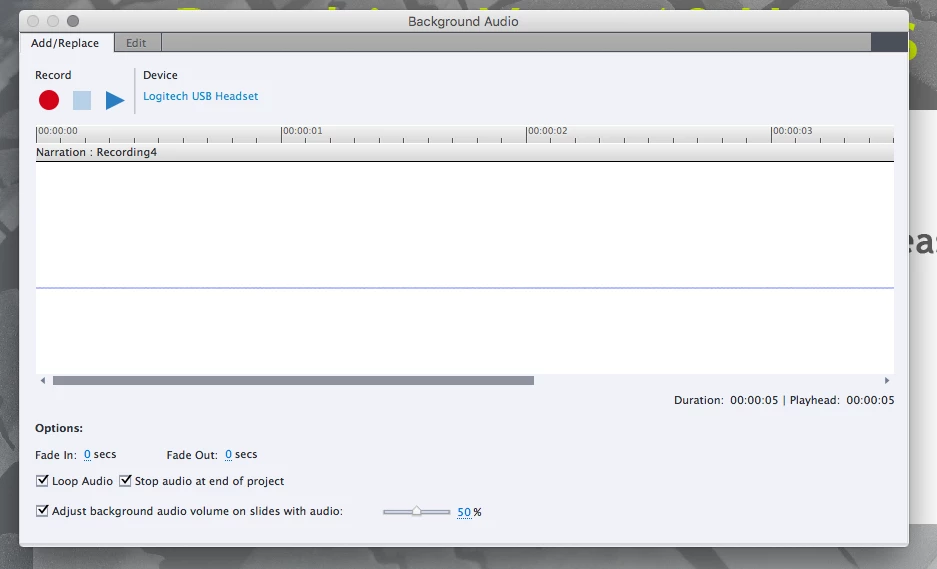
Please help!

This topic has been closed for replies.
Correct answer RodWard

You can usually hit the ESCAPE key on the keyboard to quit a dialog.  However if you do that you will lose any audio you may have recorded in that window. 

Your dialog screen shot doesn't appear to display the usual buttons at the bottom that allow you to save the audio or close the dialog.  What happens if you click the Edit tab?  Does that give you options to save the recorded audio and close the dialog.

3 replies

kellies50617532
Inspiring
July 20, 2016

Thank you! The Edit tab didn't have any of the usual buttons for saving either. The Esc key worked. Thanks so much!

RodWard
Community Expert
Community Expert
July 20, 2016

It sounds like you may have your computer resolution set too low which can then cause the dialogs NOT to display those buttons.  Try increasing your screen resolution to the next available setting and see if the buttons then become visible.

RodWard
Community Expert
RodWardCommunity ExpertCorrect answer
Community Expert
July 20, 2016

You can usually hit the ESCAPE key on the keyboard to quit a dialog.  However if you do that you will lose any audio you may have recorded in that window. 

Your dialog screen shot doesn't appear to display the usual buttons at the bottom that allow you to save the audio or close the dialog.  What happens if you click the Edit tab?  Does that give you options to save the recorded audio and close the dialog.

juanramirez7
Participant
February 2, 2020

Sir, I know this post and your reply is almost 3 and a half years old. However, you just saved me from losing literal hours of work. Guess I should remember to save more often. In any case, thank you for a being a life (and work) saver!

RodWard
Community Expert
Community Expert
February 2, 2020

De nada.

Lilybiri
Legend
July 20, 2016

Record just a small clip. When finished you'll be asked to save and then you can cancel.