
New_guy1
Inspiring
December 5, 2016
Answered

How to get top-of-screen pixel slider

  • December 5, 2016
  • 2 replies
  • 260 views

I have a responsive project open and I would like to see how it would look like in iPad and iPhone size screens.

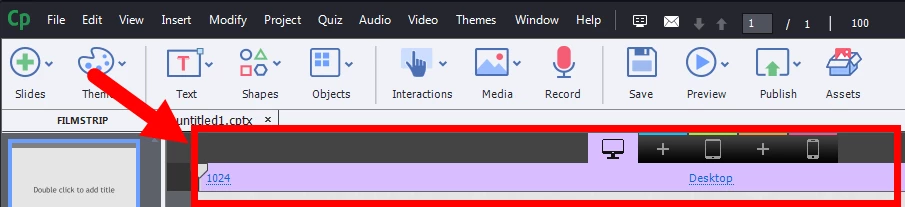
However, I need the purple slider thinggie at the top of my screen (see graphic).

How can I get this to appear?

(This is a responsive project file I inherited from someone else.)
    This topic has been closed for replies.
    Correct answer Lilybiri

    This means you have a normal project, not a responsive project. Sorry, there is no way to turn a normal project into a responsive project. PPT is not responsive, you have a fixed size project, hence it is normal.

    2 replies

    Lilybiri
    Legend
    December 5, 2016

    Rod's answer is to the point but I'm a bit confused: if you are in a responsive project, you should see those bars in editing mode as well. The colors are used to indicate if an object's properties are inherited from a breakpoint view. Are you sure that you have inherited a responsive and not a normal project that was set to rescale?

    New_guy1
    New_guy1Author
    Inspiring
    December 5, 2016

    Hi Rod and Li:

    I was inadvertently ambiguous in my question.

    I received someone else's work-in-progress which was created using a PPTX file.

    When you create a project from a PPTX file, it defaults to CPTX but the slider thinggie at the top of the screen doesn't appear.

    The screen capture I uploaded into my question was merely meant as a guide because I don't know the official name of that UI thinggie

    I want to turn that thinnggie on.

    That's all I need.

    Apologies for the wording of my question.

    Lilybiri
    LilybiriCorrect answer
    Legend
    December 5, 2016

    This means you have a normal project, not a responsive project. Sorry, there is no way to turn a normal project into a responsive project. PPT is not responsive, you have a fixed size project, hence it is normal.

    RodWard
    Community Expert
    Community Expert
    December 5, 2016

    Your screenshot shows you are in Edit mode.  If you want to see how the content will look at runtime you need to Preview the HTML5 either by publishing out and uploading to a web server or by using the Preview in Edge Inspect option.