justinm53961168
Inspiring
April 11, 2016
Answered

how to give objects value on load

  • April 11, 2016
  • 2 replies
  • 317 views

I read through some of the posts on Advanced Actions and Conditional Statements but I couldn't find an answer.

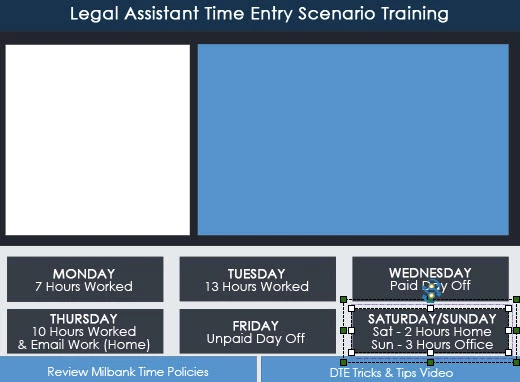
Very simple what I need: when user clicks one of the days of the week tab, I want that content to place in the middle.

I created a variable called 'day' but how do I set it to 'monday' or 'tuesday' on load so that when the appropriate button is clicked I can run a conditional statement: If 'day' = monday then show 'monday content'. Is there a way to assign a variable without user interaction? like when a slide loads.

I'm sure this is super simple but I want to do it th

    This topic has been closed for replies.
    Correct answer RodWard

    My apologies.  As I said, I wasn't sure that I was understanding your intention.

    Sounds like you need to have a number of text captions or Smart Shapes hidden on the slide where you want the content to appear.  These objects will contain the relevant information corresponding to a given day.  But you set all those objects to occupy the same space on the slide, one on top of the other, and you set their Visible in Output value to OFF (so that they will be initially invisible to the learner) and group them.  Making them into a group just makes it easier to HIDE them all with a single action line.

    When your user clicks one of the buttons at the bottom that corresponds to a given day, that button could just execute a Standard action that has two action lines. The first line should HIDE the group, (so that any objects made visible from previous button clicks are immediately hidden) and then SHOW the specific caption or smart shape that corresponds to the day the user clicked.

    Unless you intend doing something else with the variable, there's no need to have a variable set to any value just to achieve the interaction I have described above.  However, if you DO later need to know which day the user clicked on (perhaps to use it in some Conditional Action) then you can add a line action that assigns the variable value.

    Is that closer to what you want?

    2 replies

    Lilybiri
    Legend
    April 11, 2016

    You can use the On Enter slide event as trigger for any (advanced/shared) action. Have a look at the overview of events:

    Events and (advanced) Actions - Captivate blog

    justinm53961168
    Inspiring
    April 11, 2016

    I just bookmarked your blog and will definitely read it today! thanks for sharing that

    RodWard
    Community Expert
    Community Expert
    April 11, 2016

    I'm not sure if I understand what you're trying to do.

    If you want the course to know what the current day is, then you can use the System Variable cpInfoCurrentDay.

    Sunday = 1, Monday = 2 etc.

    justinm53961168
    Inspiring
    April 11, 2016

    that isn't it at all - I thought I explained it.

    When a user clicks on the day, then I need content to load.

    Example: Monday will load the Monday content, Tuesday will load the Tuesday content.

    When the user clicks Monday, I need to assign 'Monday' to a variable, and then run the 'Monday content' associated...same with all the other days.

    RodWard
    Community Expert
    RodWardCommunity ExpertCorrect answer
    Community Expert
    April 11, 2016

    My apologies.  As I said, I wasn't sure that I was understanding your intention.

    Sounds like you need to have a number of text captions or Smart Shapes hidden on the slide where you want the content to appear.  These objects will contain the relevant information corresponding to a given day.  But you set all those objects to occupy the same space on the slide, one on top of the other, and you set their Visible in Output value to OFF (so that they will be initially invisible to the learner) and group them.  Making them into a group just makes it easier to HIDE them all with a single action line.

    When your user clicks one of the buttons at the bottom that corresponds to a given day, that button could just execute a Standard action that has two action lines. The first line should HIDE the group, (so that any objects made visible from previous button clicks are immediately hidden) and then SHOW the specific caption or smart shape that corresponds to the day the user clicked.

    Unless you intend doing something else with the variable, there's no need to have a variable set to any value just to achieve the interaction I have described above.  However, if you DO later need to know which day the user clicked on (perhaps to use it in some Conditional Action) then you can add a line action that assigns the variable value.

    Is that closer to what you want?