Known Participant
October 8, 2009
Question

how to have caption extend for duration of video

  • October 8, 2009
  • 1 reply
  • 909 views

Hi,

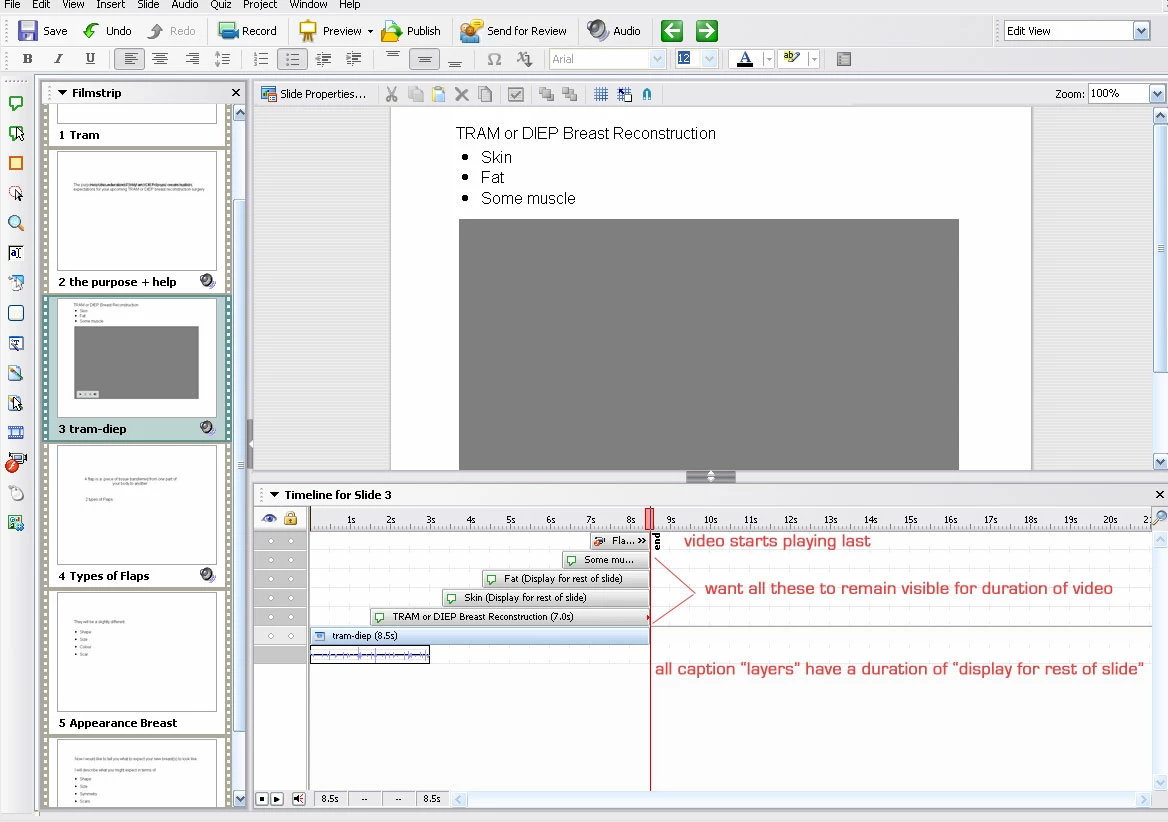
On a slide, I have some captions that appear first in the timeline, followed by a FLV video.

I want the captions to remain visible on the slide for the duration of the video.

By the way (and I wrote this on the screenshot), all the captions are set to display for "rest of the slide".  The flv layer is set to display for "duration of video".

Please see the screenshot for reference.

Thanks!
This topic has been closed for replies.

1 reply

October 9, 2009

Hi Chieripot,

For text captions, make sure that you select "Fade in only" in the Effect dropdown in the properties dialog under the Options tab.

-Manish

http://blogs.adobe.com/captivate

chieripotAuthor
Known Participant
October 9, 2009

Hi Manish,

Yes, I already did that -- I forgot to mention it in my original post. 

Any other ideas?


Thanks

October 13, 2009

Hi chieripot,

The best option would be show the FLV for "Specific time" and enter the exact time for the FLV. Thereafter, set the same time for text captions.

Hope this helps..

-Manish

http://blogs.adobe.com/captivate