JaySusith82
Known Participant
April 19, 2010
Answered

How to make a Pre Test in Captivate 4

  • April 19, 2010
  • 1 reply
  • 2260 views

I am currently doing some research into buying Captivate 4 at work, which is to be our new E-learning Development tool. One of the features that our current development tool provides is the "pre-test". This allows to setup a quick assessment at the start of the E-learning and depending on the questions (or score) they got wrong, it will reccommend what modules the user needs to take (or it hides the modules that they are already proficient in).

I installed the Captivate trial at home and working my way of learning all about it. I understand that there are no pre-defined feature to create a "Pre-test". But can someone tell me whether this can be done in Captivate 4, and if so... how do I do it please?

I don't really mind if I have to learn about variables, coding and even action script (god help me!)... but I would really love to have the ability to do this in Captivate 4.

Whoever helps out... is my new best friend!!!

Thanks
This topic has been closed for replies.
Correct answer Lilybiri

Hello,

Posted already a small reply this morning when I was in college, but see now that it did not arrive.

This is not so easy to accomplish, and rather difficult to explain. Would be easier with an example, but will give it a try with text and snapshots first.

  1. You will have to create your proper question slides. In my example I had simple Yes/No questions, so I had to create Yes and No-buttons on each questions slide. I wanted to give an immediate feedback to the user; for this reason I created two Text Captions (one for the Yes-answer and another for the No-answer), initially hidden on the question slide.
  2. To store the reaction of the user (Yes/No) I created a user variable for each question slide (p.e. v_question1 v_question2...). In my case this variable could only have two possible values: 1 or 0. When user clicked on the Yes-button, an Advanced action was executed: the user variable was set to 1 and the right Text Caption was shown. The user had then to click a 'Next' button to advance to the next question. A similar Advanced action was triggered on clicking the No-button, where the user variable was set at 0 and the other Text Caption shown
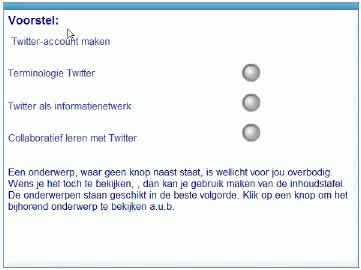
  3. When all questions slides are finished, user arrives at the 'menu' slide. I did show all the 'modules' initially with a button, used to jump to the right slide. With an advanced action, triggered on entering this slide I check the user variables, and based on their value I show (value=0) or hide (value=1) the button to the right of the module. So the user can only open the modules he is proposed to see. Attach a small snapshot of this slide:


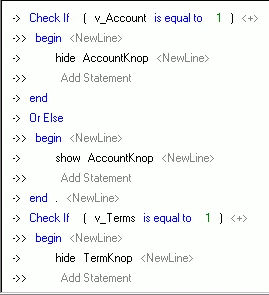
And part of this last advanced script:

Hope this gets you started?

Lilybiri

1 reply

Lilybiri
Legend
April 20, 2010

Hello,

Welcome on the forum.

Have developed already something like you asked, indeed by using variables and advanced actions. It is possible, but be aware that it is not wise to make a CP-project too big. Some recommendations are talking about 50-60 slides, I already realized up to 120slide, but a lot depends on the inserted assets: are you planning to add lot of audio (inflates the filesize a lot)? I'm telling this in case you want to realize all of it in one file. The file I'm talking about had:

1. a pretest with self-created Question slides, resulting in values for user variables

2. a menu with proposed modules, based on the results of the questions.

3. in the menu the user could press one of the proposed modules and was sent to the module

4. finished one module, the user was returned to the menu, achieved module was marked and user could choose another

Is this what you want to do?

You could also use different files, and open them from the 'master file', containing the pretest and a sort of menu with the proposed modules. Propose this for the usecase where one file would be too big.

Lilybiri

JaySusith82
Known Participant
April 20, 2010

Thanks for your reply.... my new best friend!

The type of package you described is exactly what I'm looking for. I probably won't be creating a huge package on this. Certainly no audio or videos. However thanks for your advice on managing files sizes, which will be very helpful in the future.

Can you lead me in the right direction as to how I would go abouts developing a package like you described (with a pre test)? Although I do not have much experience using variables and advanced actions in captivate, I do have a decent understanding about coding (from Visual basics and VBA) and I am very keen to learn! So I will try my best to understand if you could explain how to do this.

Thanks again

Susith

Lilybiri
LilybiriCorrect answer
Legend
April 21, 2010

Hello,

Posted already a small reply this morning when I was in college, but see now that it did not arrive.

This is not so easy to accomplish, and rather difficult to explain. Would be easier with an example, but will give it a try with text and snapshots first.

  1. You will have to create your proper question slides. In my example I had simple Yes/No questions, so I had to create Yes and No-buttons on each questions slide. I wanted to give an immediate feedback to the user; for this reason I created two Text Captions (one for the Yes-answer and another for the No-answer), initially hidden on the question slide.
  2. To store the reaction of the user (Yes/No) I created a user variable for each question slide (p.e. v_question1 v_question2...). In my case this variable could only have two possible values: 1 or 0. When user clicked on the Yes-button, an Advanced action was executed: the user variable was set to 1 and the right Text Caption was shown. The user had then to click a 'Next' button to advance to the next question. A similar Advanced action was triggered on clicking the No-button, where the user variable was set at 0 and the other Text Caption shown
  3. When all questions slides are finished, user arrives at the 'menu' slide. I did show all the 'modules' initially with a button, used to jump to the right slide. With an advanced action, triggered on entering this slide I check the user variables, and based on their value I show (value=0) or hide (value=1) the button to the right of the module. So the user can only open the modules he is proposed to see. Attach a small snapshot of this slide:


And part of this last advanced script:

Hope this gets you started?

Lilybiri