New_guy1
Inspiring
December 14, 2016
Answered

How to make Caption Boxes smaller!

  • December 14, 2016
  • 2 replies
  • 271 views

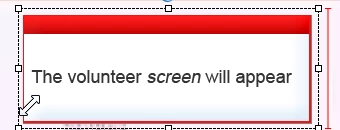
I'm working with captions and wanted to size one down a few millimeters because there was too much space in the top and bottom areas.

It wouldn't let me.  It generated a red vertical line and then froze (see graphic).

Question:  How can I make captions smaller? Vertically and horizontally?
    This topic has been closed for replies.
    Correct answer Captiv8r

    Hi there

    Captions are based on bitmap images that have a specific pixel dimension. The smallest possible size is determined by the image used. Some of them are quite small and others seem to be quite large. The only way to make them smaller is to either switch to using a Smart Shape or to create another bitmap image you want to use. Or possibly use a different caption type.

    Cheers... Rick

    2 replies

    Lilybiri
    Legend
    December 14, 2016

    There is a minimum width. Rick know that I always will recommend to replace those old captions (based on bitmap images, where the padding is defined in a FCM file) by shapes.

    Captiv8r
    Captiv8rCorrect answer
    Legend
    December 14, 2016

    Hi there

    Captions are based on bitmap images that have a specific pixel dimension. The smallest possible size is determined by the image used. Some of them are quite small and others seem to be quite large. The only way to make them smaller is to either switch to using a Smart Shape or to create another bitmap image you want to use. Or possibly use a different caption type.

    Cheers... Rick