
September 29, 2013
Question

How to publish a smaller SWF file

  • September 29, 2013
  • 1 reply
  • 1130 views

Dear Sirs,

I have create a Captivate project to output SWF file as product demo. The swf file has a high resoluation, but it is too large, I want to get it more small in file size, some compromise in quality is acceptable.

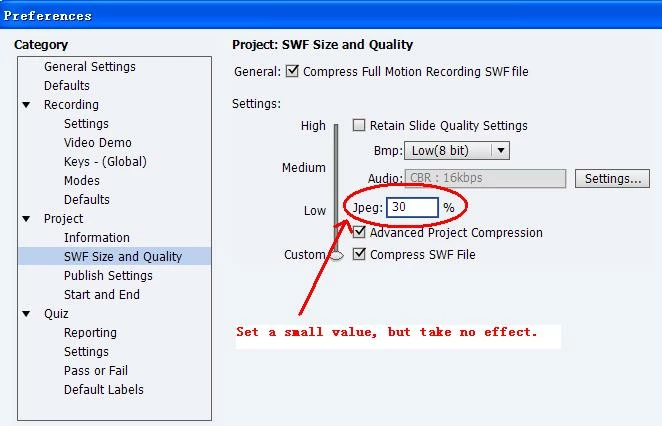
I have set a smaller Jpeg% value on SWF Size and Quality when publishing the project, but it take no effect, anyone help me? Thanks.
This topic has been closed for replies.

1 reply

Lilybiri
Legend
September 29, 2013

Hello and welcome,

Several factors will be responsible for the SWF output file. You use high resolution (ppi, 24-bit; sometimes I have better results with Optimized which cannot be set here but has to be done in the slides themselves), probably needed because of quality. You can reduce more by setting only those slides that need this high quality to High (or Optimized) and leave the others at Low but this also has to be done in the Slide Properties and then you'll have to check 'Retain Slide Quality Settings'. But what is the total resolution of your project: widthxheight? Because that is also one of the main factors! Next question: do you have audio? Audio clips add a lot more to the filesize than slides and/or graphics. If you have be sure to keep the lowest acceptible settings for the audio. Do you have video inserted? Again... adds to filesize.

Maybe this seems a stupid question, but I have so often seen files with slides that have an unneccessary long duration. Each second of a slide adds 30frames to your project...

Lilybiri

September 29, 2013

Dear Lilybiri,

Thanks for your quickly reply. There is maybe some misunderstand cause by my wrong description "has a high resoluation", my real means is that the swf is clear enougth, I allow some reduce in quality to reduce file size. In fact, all picture of slide in this project is set Quality:Low(8 bit), no audio, no video.

I think the Jpeg% value on SWF Size and Quality should take effect, but it doesn't work. Even I use different value, for example 30%,80%,100%, it still produce the same quality SWF file, therefore the file size is still too large.

Maybe it is jammed by any trigger?

Lilybiri
Legend
September 29, 2013

After all these years with Captivate, I'm not even sure where the JPEG settings are used (except maybe for JPEG choice in slide quality). The background images are BMP, and already set to Low as you points out. Normally graphics are converted to PNG... It is and remains a mystery to me, sorry.

Lilybiri