

How to remove selected objects from the parameter list when saving a shared action
Hi everyone,
I think I'm finally wrapping my head around shared actions. There's one thing that's puzzling me, though, and I haven't been able to find an answer online. I'm hoping someone can help.
On the Advanced Actions dialog, when I click Save As Shared Action, I get a list of parameters. The parameters are items from the advanced action which I'm saving, including variables, literals, and objects such as buttons and smartshapes. See screenshot below.
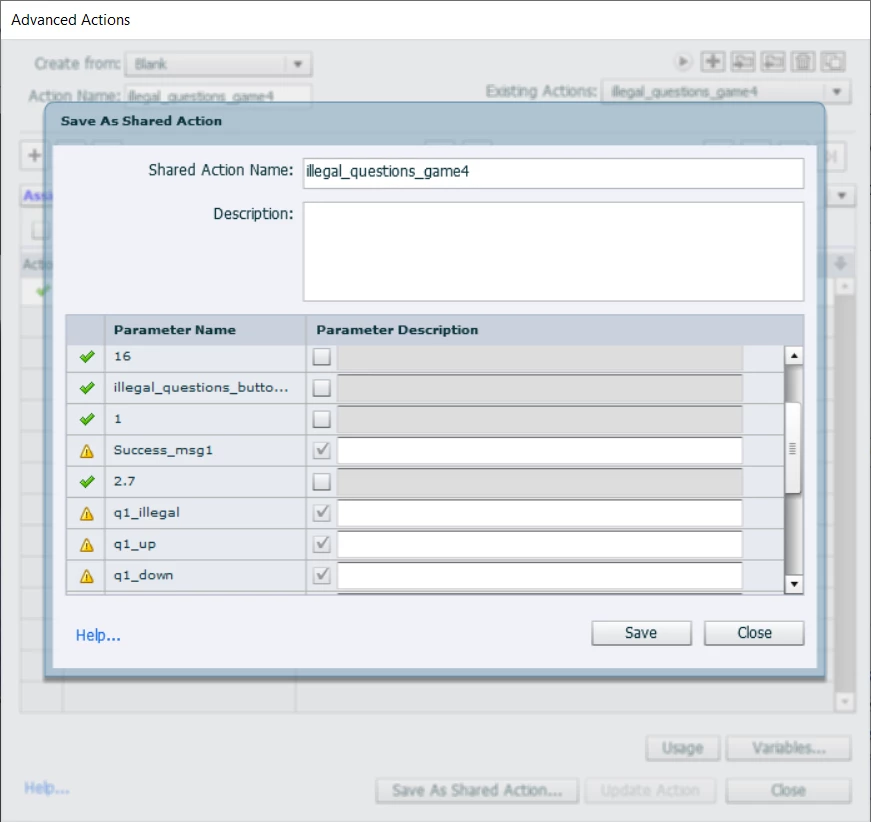
If I don't need to use a variable or a literal, I can deselect it (for example, I've deselected the literals 16 and 1 as shown above).
But I don't seem to be able to deselect any objects: nothing happens when I click the checkbox for the object.
In this example, I want Success_msg1 parameterized. But I don't want q1_illegal parameterized, because it's always going to be the same (the just script shows and hides it, based on conditional logic). There are about 8 other objects I don't want parameterized.
How can I deselect these objects or better yet, keep them from showing up in the first place?
Thanks!
Kathryn


 AdChoices