Micha_Brans
Inspiring
October 26, 2015
Answered

How to remove the Name & Email popup in Captivate 9?

  • October 26, 2015
  • 1 reply
  • 691 views

I am searching for the answer to this already for some weeks now, there are many posts but only few real answers so I hope you guys can help me.

I am coding (in PHP) an internal LMS using Adobe Captivate 9 where the results of the quiz are posted to "Internal Server". This works nice and I have changed the default InternalServerReporting script so it does push the results to our database so we can use them in our Admin console.

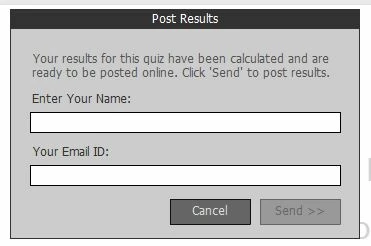
Every user who take a course needs to login first so we do already know the name and email address of this user, but still at the end of each quiz, Captivate gives the popup where it asks to enter the name and email address of the user:

Some months ago, when I was still using Captivate 8, I found a post somewhere (unfortunately I can't remember where) that pointed out to 1 setting that you can change (not in a menu, it was more in an ini file or regkey and as far as I remember even not in the project but more in the installed software) and that did the trick. Now I have upgraded to Captivate 9 and the same comes back but can't find that fix anymore.

Does anyone maybe know how to get rid of this popup in Captivate 9 or else know where to find that original answer that I found months ago?

Thanks Micha

This topic has been closed for replies.
Correct answer Micha_Brans

The PopUp is displayed because Captivate does not know any details from the student, however it does needs these to post the results.

Captivate stores these values in the variables cpQuizInfoStudentID (for email) and cpQuizInfoStudentName (for name) and you can pass these via the URL that you use to start the course:

Instead of using the <a href = 'course.htm'> link, you can use <a href = 'course.htm?cpQuizInfoStudentID=[email]&cpQuizInfoStudentName-[name]'>, this did completely remove the popup and does post the results straight after the last answer.

1 reply

adtiwari
Adobe Employee
Adobe Employee
November 12, 2015

Hi Micha,

You should probably consider using the variables cpQuizInfoStudentID (for email) and cpQuizInfoStudentName(name) in the script you are using for reporting to avoid the pop-up. If you set these variables with the values that you are requesting before login, should resolve the issue.

Regards,

Aditya Tiwari

Micha_Brans
Inspiring
November 12, 2015

Hi adtiwari

Thanks for the answer, just can you please explain me how I should do that?

We are using Captivate 9 to create the course and publish it on a self-made small PHP-based LMS.

I do know the user's name and email already when the user starts the course but how can I pass these 2 variables to the course?

When a user starts a course, I do send him to the htm file that Captivate created when I published the course and the reporting is covered in the InternatServerReporting that seems to be backed in to Captivate. If there a way to include these values in the URL or so?

Maybe something like course.htm?cpQuizInfoStudentID=email&cpQuizInfoStudentName-name or so?

Thanks

Micha

Micha_Brans
Micha_BransAuthorCorrect answer
Inspiring
November 12, 2015

The PopUp is displayed because Captivate does not know any details from the student, however it does needs these to post the results.

Captivate stores these values in the variables cpQuizInfoStudentID (for email) and cpQuizInfoStudentName (for name) and you can pass these via the URL that you use to start the course:

Instead of using the <a href = 'course.htm'> link, you can use <a href = 'course.htm?cpQuizInfoStudentID=[email]&cpQuizInfoStudentName-[name]'>, this did completely remove the popup and does post the results straight after the last answer.