
Inspiring
September 23, 2015
Answered

How to rename tooltips for buttons in playbar

  • September 23, 2015
  • 2 replies
  • 439 views

I have seen a couple questions on this topic and I've read the blog post on how to do this: http://blogs.adobe.com/captivate/tag/adobe-captivate-playbars.

However, I do not understand the section on Tooltips. Can someone please walk me through the steps in a non-technical way??
    This topic has been closed for replies.
    Correct answer TLCMediaDesign

    When you open one of the playbars in Flash, press F9. It will open the script window.

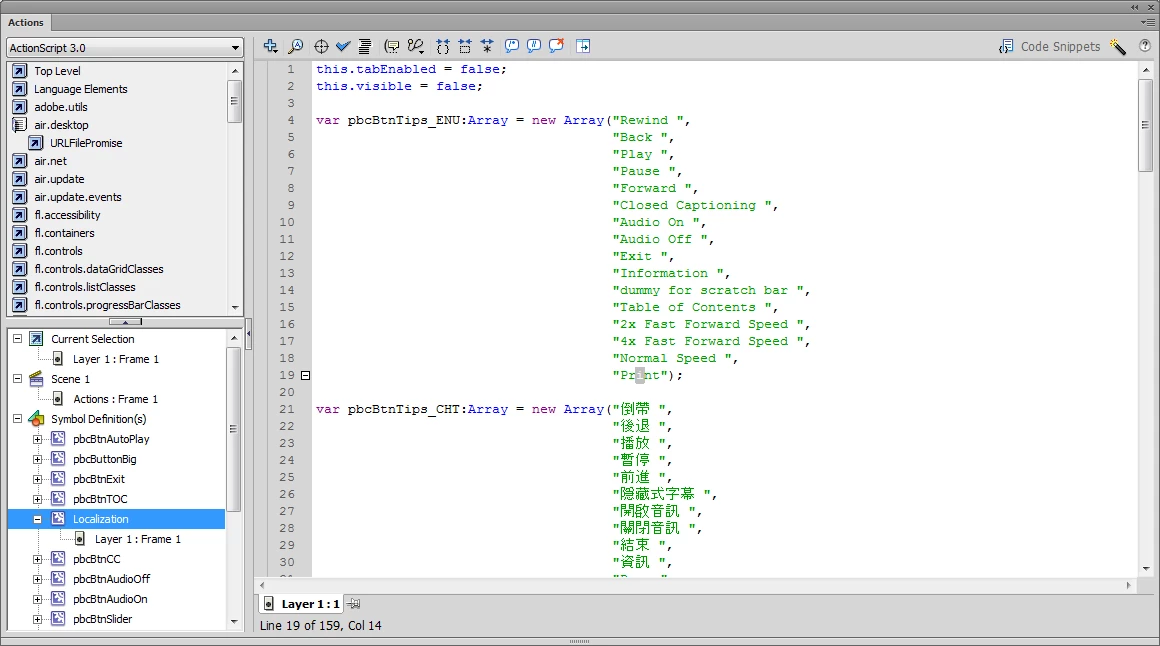
    Then click on the MovieClip Localization in the lower left pane as shown in the image. The text will appear in the script pane

    2 replies

    Inspiring
    September 23, 2015

    Thanks, I figured it out. I downloaded a free trial of Adobe Flash Professional.

    TLCMediaDesign
    TLCMediaDesignCorrect answer
    Inspiring
    September 23, 2015

    When you open one of the playbars in Flash, press F9. It will open the script window.

    Then click on the MovieClip Localization in the lower left pane as shown in the image. The text will appear in the script pane

    Inspiring
    September 23, 2015

    Pardon my ignorance, but what program are you using in your screenshot?