wdolphin
Known Participant
May 3, 2018
Answered

How to reset a variable that increments when clicked

  • May 3, 2018
  • 2 replies
  • 642 views

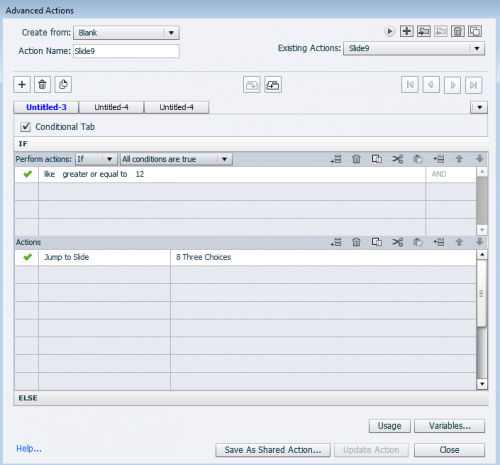
I have 12 questions on a slide and they have to get all correct in order to move on.  I have 2 variables.  Like is incremented by one when correct for each question.  When variable like is greater or equal to 12 they move on to the next slide. 

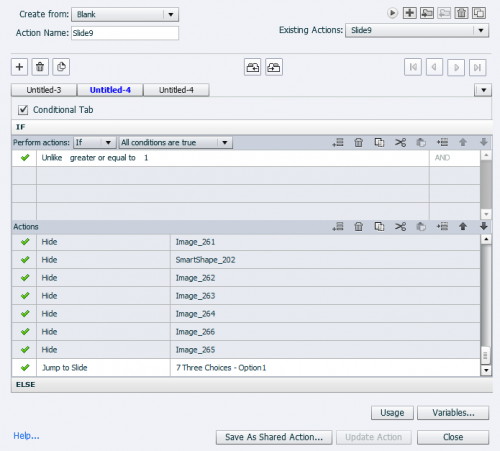
When they answer a question incorrectly my Unlike variable is incremented by 1.  If the variable is 1 or greater they jump back to start that slide again.  

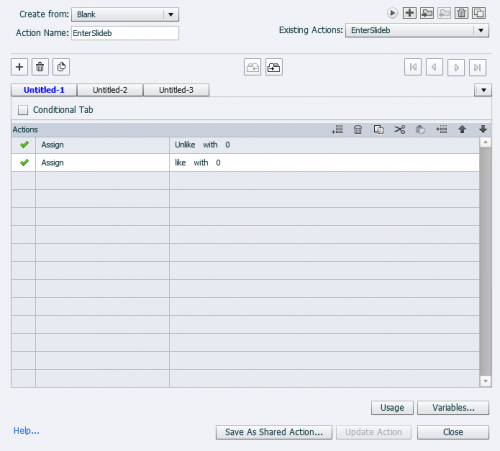
I have a Advanced Action on enter that says assign like variable to 0   and unlike variable to 0.  This is not resetting for some reason because if I get them all correct on the second run through it still sends me back to start the slide again.  

I have included my advanced actions screen shots below.  Any suggestions would be appreciated.
This topic is closed to new replies. Start a new post to keep the conversation going.
Correct answer RodWard

Your interaction needs to be a little more complicated than you have made it in order for it to be much more robust and reliable.

I would suggest you need to have one tracking variable for each question, set it to 0 by default, and have the On Success action of the question execute an Advanced Action where the first decision block is NOT conditional but just sets the relevant tracking variable for that question to 1 when the user answers correctly.  Then you need a second decision block in the same Advanced Action that IS set to be Conditional which checks the values of all tracking variables and advances the user to whatever slide you want them to go to after all questions are correct.

If you want to go back through these questions again afterward, you are going to need an action that resets all tracking variables back to 0 again in readiness for the next attempt.

2 replies

RodWard
Community Expert
RodWardCommunity ExpertCorrect answer
Community Expert
May 3, 2018

Your interaction needs to be a little more complicated than you have made it in order for it to be much more robust and reliable.

I would suggest you need to have one tracking variable for each question, set it to 0 by default, and have the On Success action of the question execute an Advanced Action where the first decision block is NOT conditional but just sets the relevant tracking variable for that question to 1 when the user answers correctly.  Then you need a second decision block in the same Advanced Action that IS set to be Conditional which checks the values of all tracking variables and advances the user to whatever slide you want them to go to after all questions are correct.

If you want to go back through these questions again afterward, you are going to need an action that resets all tracking variables back to 0 again in readiness for the next attempt.

wdolphin
wdolphinAuthor
Known Participant
May 3, 2018

Rod -Thank you , I added individual variables to each question and assigned each variable on enter to 0.  This worked perfect.