Global Recordings
Known Participant
August 14, 2021
Answered

How to return to slide after finsihed with the last image

  • August 14, 2021
  • 2 replies
  • 210 views

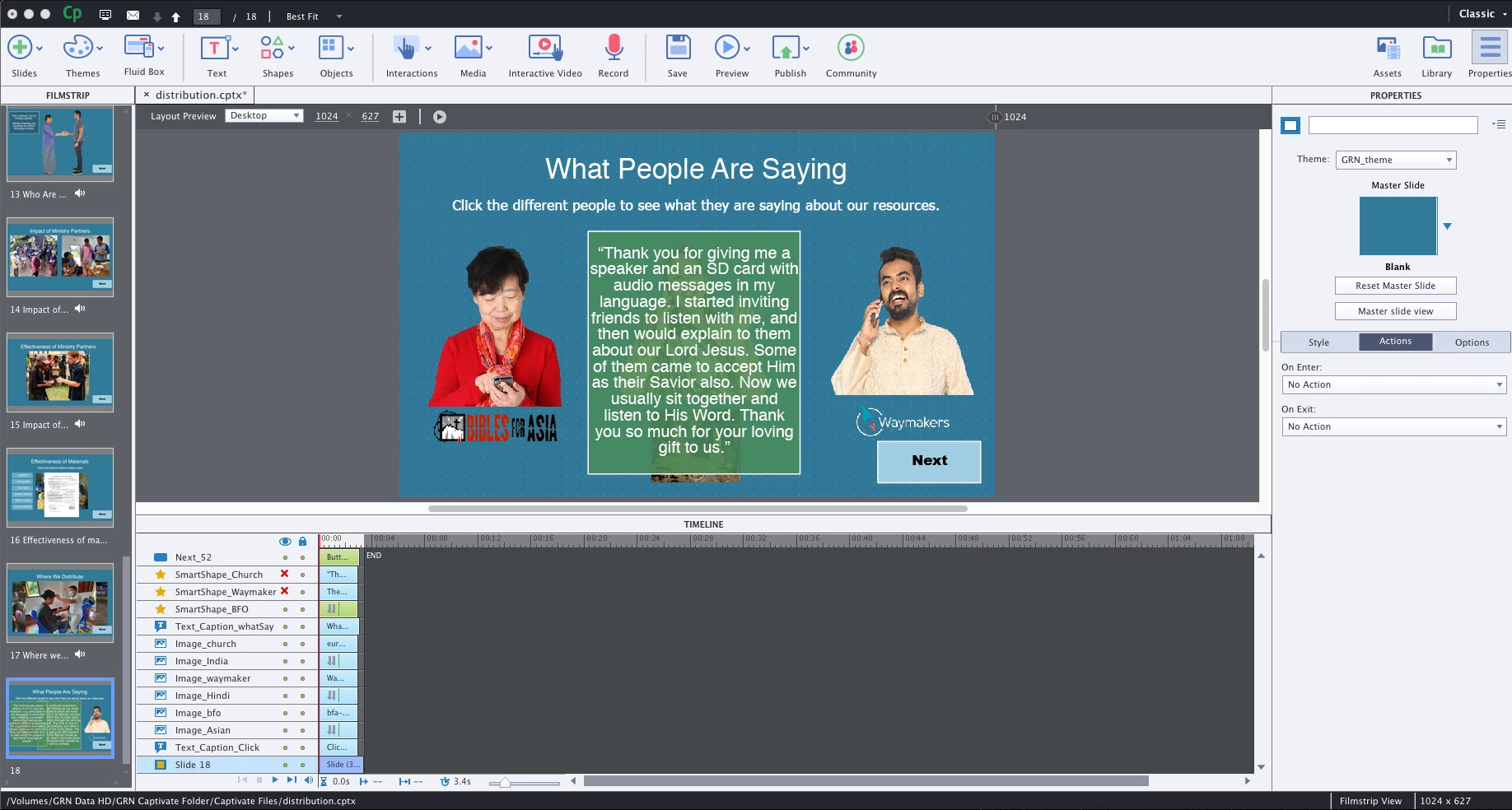
I am creating a click and reveal slide that has three separate SmartShapes with text that I want to reveal. I have three images that when clicked on will execute an Advanced Action that will show the SmartShapes. What I cannot figure out is how to return to the slide and have all the images showing without the SmartShapes. On the screenshot you will only see one of the SmartShapes; I hid the other two so the slide can be seen. The Click and reveal does work, I just cannot return to the slide. Thanks for any assistance.


This topic has been closed for replies.
Correct answer Lilybiri

My reading of your question may be different from Rod's, reason why I want to propose a simpler solution.

You didn't specify the actions you are using. From the screenshot I suspect you have the Smartshapes all in the same location? In that case I would have preferred to use a multistate object, having an empty normal state. Instead of hiding you would not even need an advanced action, just a Change state action. When keeping the option 'Retain state on slide revisit' unchecked, nothing would have been needed to reset the slide on revisit, because the Normal empty state would have showed up. That empty state can be a shape with alpha = 0 and stroke width = 0.


Even if you want to keep the Show/Hide approach, no variables are really needed, since you don't seem to force the learner to reveal all shapes. My proposal:

  1. Group the shapes, will label the group Gr_Info
  2. For the advanced action you need two commands:
         Hide Gr_Info
         Show Infox                               where you point to the proper shape
    Advantage: this can be used for any anu amount of click/reveal interactions on a slide. I use a shared action but that is off topic
  3. Use the On Enter event of the slide to launch the simple command 'Hide Gr_Info'. 

 

2 replies

Lilybiri
LilybiriCorrect answer
Legend
August 14, 2021

My reading of your question may be different from Rod's, reason why I want to propose a simpler solution.

You didn't specify the actions you are using. From the screenshot I suspect you have the Smartshapes all in the same location? In that case I would have preferred to use a multistate object, having an empty normal state. Instead of hiding you would not even need an advanced action, just a Change state action. When keeping the option 'Retain state on slide revisit' unchecked, nothing would have been needed to reset the slide on revisit, because the Normal empty state would have showed up. That empty state can be a shape with alpha = 0 and stroke width = 0.


Even if you want to keep the Show/Hide approach, no variables are really needed, since you don't seem to force the learner to reveal all shapes. My proposal:

  1. Group the shapes, will label the group Gr_Info
  2. For the advanced action you need two commands:
         Hide Gr_Info
         Show Infox                               where you point to the proper shape
    Advantage: this can be used for any anu amount of click/reveal interactions on a slide. I use a shared action but that is off topic
  3. Use the On Enter event of the slide to launch the simple command 'Hide Gr_Info'. 

 

Global Recordings
Known Participant
August 15, 2021

Oh, you hit the nail on the head. I went back and did the multi-state and that was exactly what I needed! It worked! Now to add the audio and this slide is done! Thank you again!

Participant
August 16, 2021

the SmartShapes. On the screenshot you will only see one of the SmartShapes;

RodWard
Community Expert
Community Expert
August 14, 2021

You need to set up a variable that tracks whether or not that slide has been visited and use it in a Conditional Advanced Action which gets executed On Slide Enter of that slide.


Set the default value of the variable to 0.  The Conditional action will first check the value of the variable and if it is still set to 0 then no action is taken.  However, the ELSE action will be set to show and hide the relevant images so that what the user sees on re-entering the slide would be the setup you want them to see.


If the buttons or interactive images on the slide should NOT work the second time it is entered, then you would also need to have the ELSE actions Disable those buttons so that they cannot be used. 


Does that make sense?