Participant
August 30, 2017
Question

How to set up the correct answer on Multiple Choice?

  • August 30, 2017
  • 3 replies
  • 435 views

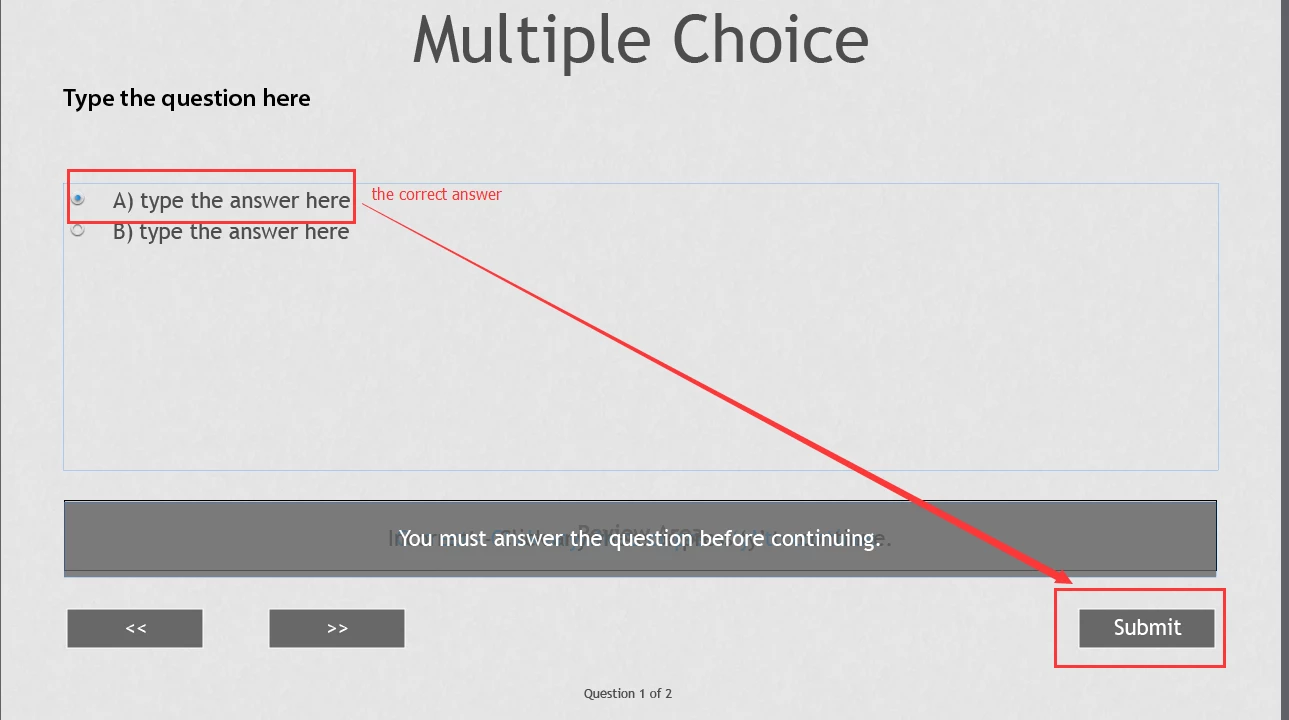
How to set up the correct answer?A is the correct answer. Can only continue to choose the right answer. How do I set up?
This topic has been closed for replies.

3 replies

Paul Wilson CTDP
Community Expert
Community Expert
August 30, 2017

You might find this tutorial helpful. 

https://youtu.be/Rva6Dk9AJWs

Paul Wilson, CTDP
papaintegrator
Inspiring
August 30, 2017

Hi hellenye,

Using the following settings the slide will only continue once the correct answer is checked:

If you rather want something else\ additional to happen, let us know.

/best

hellenyeAuthor
Participant
August 30, 2017

This is Adobe Captivate 2017

RodWard
Community Expert
Community Expert
August 30, 2017

Firstly you should probably increase the number of potential answers by setting a higher number in the Quiz tab > Answers field.  (The default number of 2 is never enough.)

Then, in Edit mode, you can specify which of the answers listed should be the correct one by clicking on the radio button  That should then move the selected item to be the line you clicked.