Hello,
If you are using Captivate 5, you can insert the Text Caption as described by Rod, in a Master slide that you apply to every slide in your project.
Another possibility is to add the Text Caption with the variables on the first slide and have it displayed for the rest of the project (Timing accordion in the Properties panel for Captivate 5).
Lilybiri
Just did see in another thread that you are using CP4, so the second work flow with displaying the TC for the rest of the project will be the way to go.
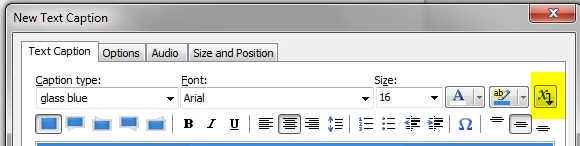
The button to insert a variable you'll find in the Properties dialog box (see screenshot) or in the Drawing toolbar in CP4
 AdChoices