Will not start ranting about the lack of completeness/good practice of Lynda.com Captivate courses (I love and use it all the time, for other applications like Illustrator, Audition, Photoshop). The most essential feature to learn about is the Timeline (in any basic training I always spend at least half a day to this feature) and you'll not find a lot about it in the training. To me that is Basic training!
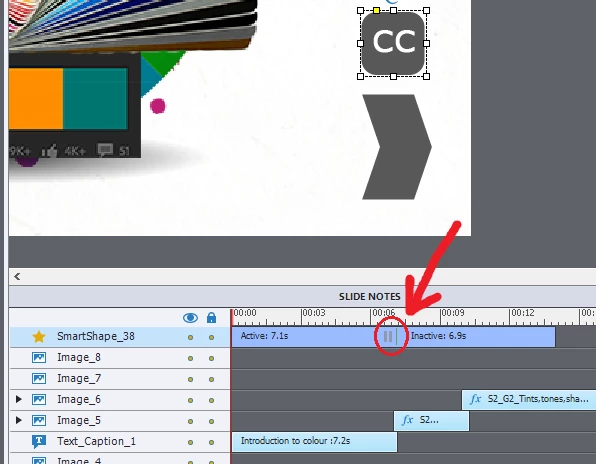
Go into the Timing Properties panel for that shape button, and turn off Pausing there.
I see that you are using this shape button on a normal slide. Why not put it on the Main Master slide if you want it for the whole project? May I also point out that your shape button is pausing at about 7 seconds, preventing several images from appearing. The button will disappear at about 13,5seconds which means the user will no longer have the possibility to toggle CC? Extend its duration for the rest of the slide (CTRL-E).
I plan a new version of this old article to cope with the new integrated Effects timelines, but maybe you'll find some ideas anyway:
Tiny Timeline Tidbits - Captivate blog
Have a look at the tutorial where I describe the use of one Shared action and states for several toggle buttons:
1 action = 5 Toggle Buttons - Captivate blog


 AdChoices