Participant
April 22, 2013
Question

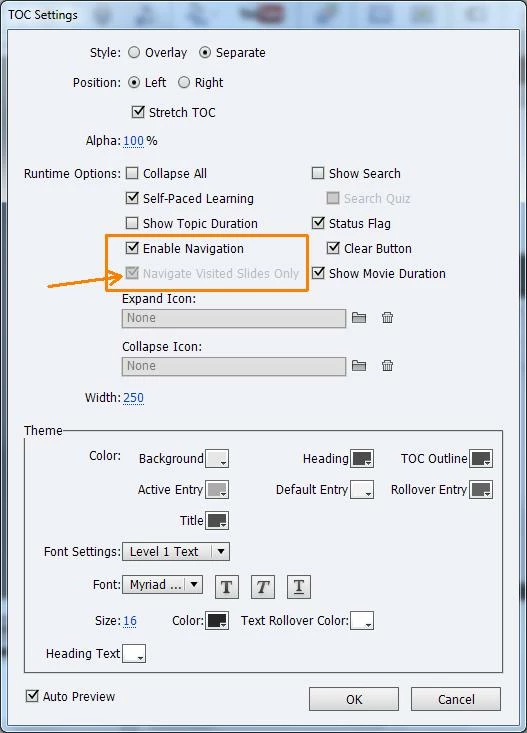
How to uncheck 'navigate visited slides only' option. It's linked to Enable navigation.

  • April 22, 2013
  • 2 replies
  • 853 views

How to uncheck 'navigate visited slides only' option. It's linked to Enable navigation. I cant disable it..
This topic has been closed for replies.

2 replies

Inspiring
November 6, 2013

I'm running into the same problem with a project in Captivate 7.  I've never had the issue before.  There must be a way the project's getting corrupted.  I do have several preferences set up.  I'm nervous to clean or re-name the folder. 

RodWard
Community Expert
Community Expert
April 22, 2013

That's not the way my version of Cp 6.1 works.  I can still untick the Navigate Visited Slides Only box if the upper box is ticked.

Which version are you on?

Have you tried renaming your Preferences folder?  Perhaps it has become corrupted.

LimskoAuthor
Participant
April 22, 2013

Im running version 6.1.

When im creating new project the checkbox works fine.

But when im opening old one I cant untick this option.

Have you tried renaming your Preferences folder?  Perhaps it has become corrupted.

> where i can find this folder?

Lilybiri
Legend
April 22, 2013

You have to know that renaming that folder will delete all customization. Some can be copied from the renamed folder.

If you are on Win7 it is labeled Captivate 6 in this path: \users\<your username>\AppData\Local\Adobe

If you didn't customize a lot, you can also use run the CleanPreferences file that you find in the folder Utils under the Captivate installation folder.

Lilybiri

BTW: tested like Rod, even for old files I can tick that option