Inspiring
July 17, 2013
Question

How to widen Properties tab (CP 5)

  • July 17, 2013
  • 2 replies
  • 627 views

When using the Classic workspace, when I add a button and then try to change the type from Text button to Image, the file selection button you use to select the image is positioned too far to the right (offscreen) to click.
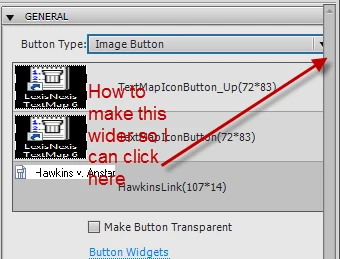
I have moused all around the sides of the tab hoping to see the cursor change to a resize arrow but it only  seems to want to let me resize vertically.

    This topic has been closed for replies.

    2 replies

    Lilybiri
    Legend
    July 17, 2013

    You probably have a label somewhere in a dropdown list that is too long. You can try to reset the workspace as suggested, but I think this will not help if that is indeed the cause. And there is still no way to increase the width of that panel, not even in CP7 and/or when you turn it into a floating panel. Maybe you could enter a feature request. Panels like Library can be made wider, not the Properties nor Quiz Properties panel. Strange.!

    Varun Kalra
    Participating Frequently
    July 17, 2013

    Hi there,

    I believe properties pane has been dragged towards right side.

    Have you tried resetting the Classic workspace?

    if you would like to save present work space, then click on new workspace and give it a name and save that, after that reset classic.

    please try that and reply.

    Thanks.

    Inspiring
    July 17, 2013

    I tried this. The width of the panel resets but the button is still not accessible.

    Lilybiri
    Legend
    July 17, 2013

    OK, have seen this issue several time, check your labels as I suggested. Of course, I'm not from the staff