
Inspiring
August 16, 2016
Answered

HTML Publish Message

  • August 16, 2016
  • 3 replies
  • 629 views

Folks

I'm publishing a captivate file that contains a pdf file  that the user can download and receiving the following message:-
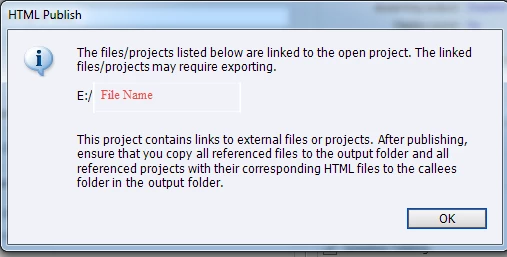
Below is my perception in interpreting the message and really need help if I'm doing it right:-

  • Do I copy the file to the root output folder as highlighted in Blue?

        OR

  • Do I copy the file to the folder callees as highlighted in Yellow?
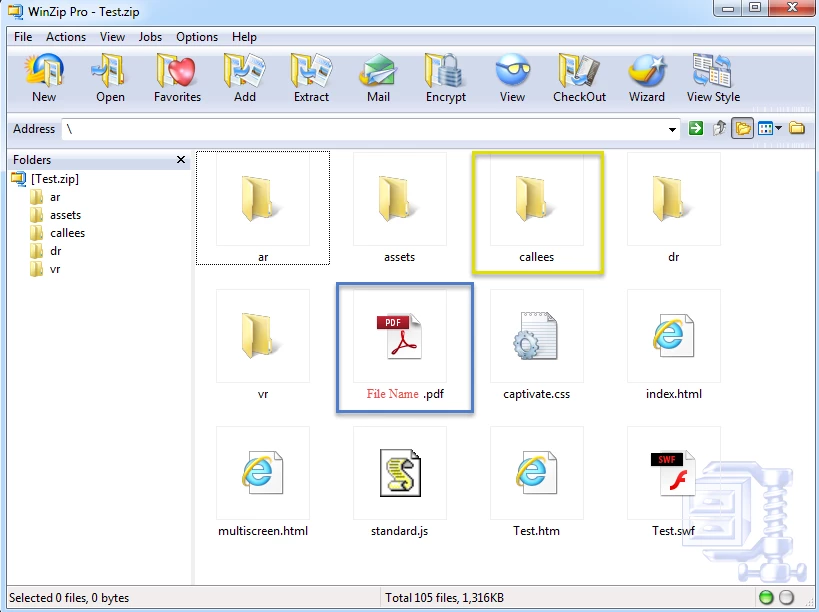
The published captivate will be uploaded onto the LMS and I'm hoping it will work fine. I know there is a thread around the flash security settings and I'm hoping our LMS doesn't have that problem.

    This topic has been closed for replies.
    Correct answer Lilybiri

    Indeed.

    3 replies

    TLCMediaDesign
    Inspiring
    August 16, 2016

    I'm fairly certain that if you put the document in the root your link should just be the document name wit no path, it needs to be a relative link. You could put it anywhere as long as the link and location is relative to the index file, so if you put it in the callees folder the link should be "callees/docName.pdf"

    Lilybiri
    Legend
    August 16, 2016

    For included files like pdf's you put them in the root of the published folder. Only projects that are linked to have to be in the callees folder. That was indeed a lot easier for SWF than for HTML output. Be sure to have relative links to the projects.

    Inspiring
    August 16, 2016

    Hi Lily

    Thank you for the reply.

    Just to clarify in this instance, the PDF file would be the one highlighted in blue since it is does not fall under projects that are linked?

    Lilybiri
    LilybiriCorrect answer
    Legend
    August 17, 2016

    Indeed.

    Allen_Partridge
    Adobe Employee
    Adobe Employee
    August 16, 2016

    I believe that the answer is 'blue' and that the callees folder is for full projects referenced by the master course, not for the files referenced by the course. (But - that is a fairly dense dialog message.) What happens when you do the blue?

    --Allen

    Inspiring
    August 16, 2016

    This is my first time. Figured I will ask folks on the forum what is the right approach or way to address the message

    Allen_Partridge
    Adobe Employee
    Adobe Employee
    August 16, 2016

    Welcome AJ - sorry, i wasn't very clear there. I was complaining that the message in the Captivate Dialog was not very well written. I think it's confusing. Your message was very clear. Sorry if I was confusing. I will mention to the team that we should look at the dialog box and see if the message can be a little easier to follow.

    Allen