
Html5 line object stops before completed
I'm using Captivate 9.0.0.223 (and Mac 10.12.06-Sierra) to create an animated graph with 5 screens. An intro screen and 4 other screens utilizing the "line" object to draw a graph line across the screen for each of 4 graphs. The output wanted is html5 only. Each screen has 4 buttons with a 'jump to slide...' action associated with each button (every slide has the same 4 buttons). In addition, each slide has a fade in textbox and a highlight box.
When clicking on (for instance) button #1, it correctly jumps to the proper slide, plays a few frames, then stops without playing the rest of the slide. If I have the slide set "on Enter" to "continue" it automatically plays about 1.5 seconds then stops. The addition of a continue button will continue to draw the graph line. If I have the "on Enter" function set to 'Pause". The additional continue button has to be clicked twice in order for the line to be drawn.
I am trying to either get the graph line to 1) autoplay (without having to click a continue button) or 2) (less desirably) with the slide set to Pause 'on Enter" have a "continue" button that only has to be clicked once.
I've checked this in Safari, Firefox and Chrome, all with the same results. I've attached a copy of one of the slide timelines. Any suggestions?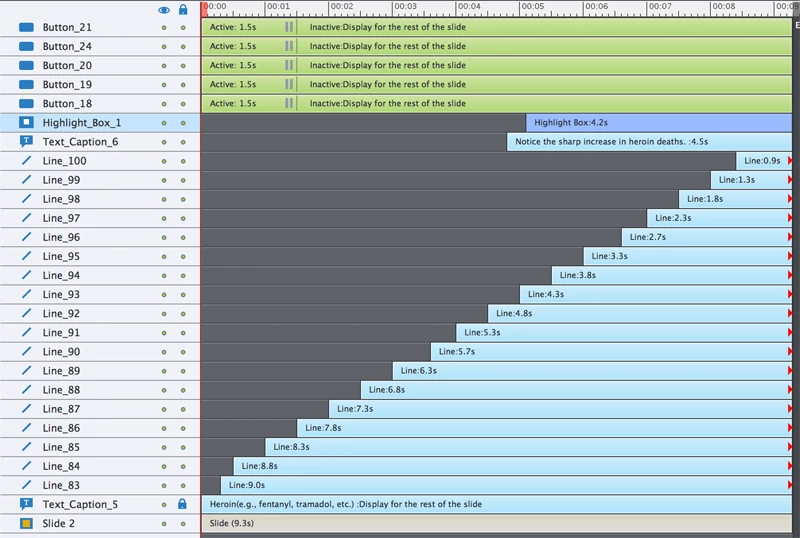


 AdChoices